Showing posts with label Business. Show all posts

Friday, February 25, 2011

Best Ways to Planning your E-Commerce Website

0 comments

Top Best E-Commerce Planning QuotesGo Professional means more planning and research. If yo plan yor web e commerce then this is the best ways do planning ecommerce website. Whether theming an e-commerce website or doing a full-scale build, one of the most important parts in the whole process is the planning. Planning a build before you start can sometimes seem like a bit of a tedious and time-consuming task, but not only will it make everything run a lot smoother, it will also save a lot of time. website altogether called online shop, e shop, online store etc. It does require technic and practice.

Best Ways to Planning your E-Commerce Website

You may be wondering where you even begin, and that’s what this article will help you answer.  Try out to have an eCommerce website for your shop before it is too late. Ecommerce website or electronic commerce website is a kind of website where every aspect or service can be sold or bought. Now a day's almost community is addicted to internet and sometimes it is really easy to shop online rather than shopping from a physical business outlet. Outgrowth of ecommerce

What Do You Want Your Site To Do?

Let’s start at the beginning. Since we are talking about an e-commerce site, I’m guessing that the aim is to sell something. We need to figure out ways to make it more compelling to buy that something.

Try to make it as easy as possible for the customer to buy your products. The well-known three-click rule applies here: You want your customer to get to what they are looking for in three or less clicks. Any more, and they may just give up. The user interface should be a primary subject to plan for.

Who’s Going to Buy From You?

Another important factor to take into account is your audience. This is something that you should consider researching properly; knowing who will want to buy your products is something that influences your design.

Do You Require Special Site Features?

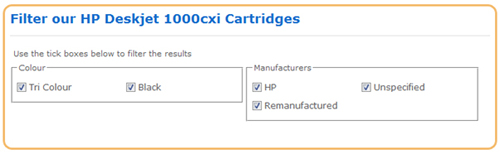
Depending on what you are selling, you may need features that other e-commerce sites do not. For example, a clothing e-store may need a refined search so that the customer can filter a search by colour or brand. Alternatively, you may want to allow the customer to use coupon codes. You should plan what features and functions you think you need or want to add.

Best Ways to Planning your E-Commerce Website

What Are Your Limitations?

Everyone has limitations — work out what yours are when you are building your site. Do you have a budget for the build, and if so, how will this limit what you can do? What technical limitations do you have? Is there any part of the build that you won’t be able to do by yourself? How does the technology limit your build?

You can do nearly anything with enough hard work, but remember that not everything will be possible.

Do You Have All the Tools You Need?

It depends on how much of the build you are doing, but you will probably need graphic editing software (i.e. Photoshop, Fireworks), a web development application (i.e. Dreamweaver), e-commerce and online store management software (i.e. Magento, OSCommerce, etc.) and the obvious things like a domain name and web hosting.

What E-Commerce Platform Are You Going to Use?

Since we are talking about e-commerce, we should take into consideration what’s going to power our website. There are countless of e-commerce platforms out there, and one of your tasks is to find one that fits your needs.

Depending on your knowledge and what your needs are, there are a various number of options that you would be able to use. If you think that you have quite a comprehensive knowledge on the subject, then maybe you should consider going for an open source cart or even building a platform yourself. If not, then there are also hosted carts to take into account.

Let’s have a look at a few platform options from different categories.

Magento

Best Ways to Planning your E-Commerce Website

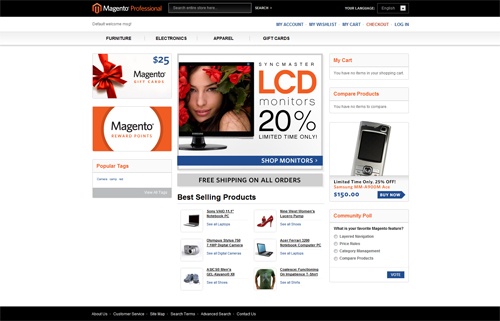
Magento is probably one of the most popular open source carts in the e-commerce platform market and, in my opinion, is probably the best free cart out there (there are also enterprise and professional versions with a yearly cost that will provide additional support).

Magento has some awesome features including analytics integration, capability of wish lists, multiple images for products, advanced product filter search, advanced customer service, tonnes of payment methods, marketing/promotional tools and so much more.

Recently, Magento has also released the world’s first mobile commerce platform. This could be very interesting, even more so now that smartphones with huge screens (such as the iPhone) are all the rage.

Shopify

Best Ways to Planning your E-Commerce Website

Shopify is a very interesting hosted platform. Compared to something open source and self-hosted like Magento, it is extremely simple to set up, manage and update. You could have a site running within minutes if you wanted to.

But Shopify does have a slight lack of features (by intent — to keep things simple), its price is a monthly fee plus, on top of that, a commission for every sale, and a hosted platform means you have less control of your platform (which isn’t necessarily a bad thing for people who just want things to work).

Content Management Systems With E-Commerce Addons

Another alternative that has recently arisen is that of WordPress, Drupal, and Joomla! shopping cart plugins, giving these content management systems e-store capabilities. There are a few, including eShop, Shopp, and WordPress MiniCart. This is great if you want a quick add-on for you existing site, but not perfect if you want a fully manageable e-commerce site.

Custom E-Commerce Site

An alternative to all this would be to go the DIY route and build your own platform. Of course, this will need a fair bit of web development knowledge and also a lot of time. But putting in all that work could be worthwhile if you have highly customized needs. Plus, if you build it yourself, you’ll be guaranteed full ownership of everything, including your code base.

Case Examples of E-Commerce Sites

Do a little bit of research into what other e-commerce sites are doing right and wrong. Try to learn and consider all your findings when you’re building your e-store.

Let’s have a look at some of e-commerce sites.

Amazon

Best Ways to Planning your E-Commerce Website

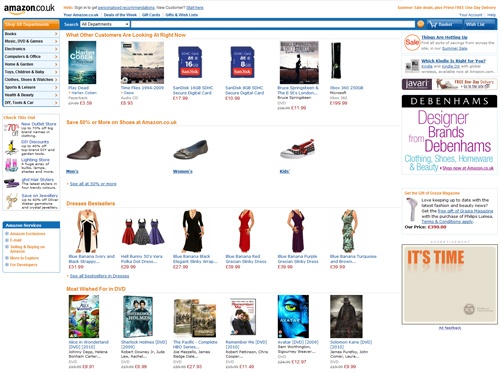
Amazon is the world’s largest online reseller, but what makes the site so brilliant? One of the main factors is the simplicity of the site: Even though it looks cluttered, it’s still easy to navigate and find what you are looking for. For example, think of any product you want to buy right now: You’ll probably find it or learn that it isn’t available on Amazon.com within three clicks.

Amazon also boasts about its customer service and if your customers are happy, then you’re doing a good job.

Other huge e-commerce sites you should look at are Zappos, Threadless, andThinkGeek.

Google Product Search

Best Ways to Planning your E-Commerce Website

Google Product Search is not really an e-commerce site, but it’s worth looking at to illustrate an important concept about planning and building e-commerce websites:simplicity is important. And if we can think of one company that excels in this concept that best, it’s Google. Google has been known for its simplicity since the beginning and this remains the case when using its product search.

Google Product Search is also great for when you have your e-commerce site up and running as well: By uploading a list of your products to Google Product Search, you open a whole new portal to your online shop.

Another remarkably simple but successful e-commerce site to look at is Woot.

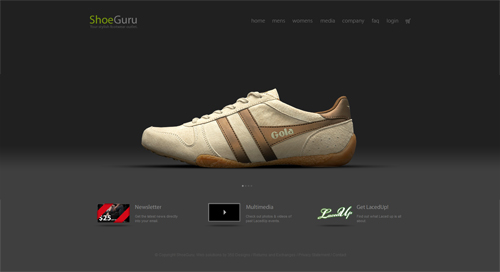
Shoe Guru

Best Ways to Planning your E-Commerce Website

Now that we’ve had a look at the largest, let’s have a look at some smaller e-commerce sites. ShoeGuru is an amazingly simplistic site, and its design is perfect for displaying their clothing products. The design comprises of a nice graphical site that gets the message across.

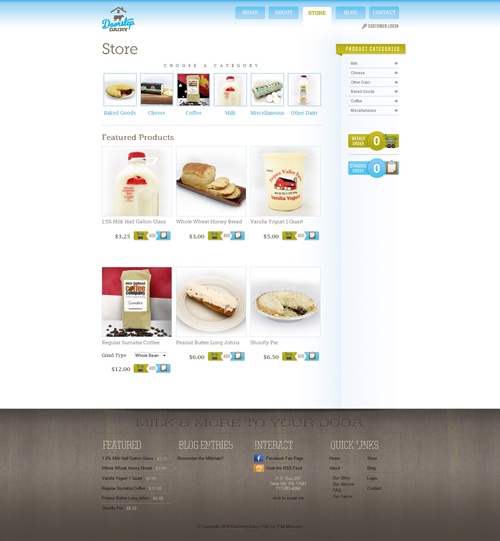
Doorstep Dairy

Best Ways to Planning your E-Commerce Website

Doorstep Dairy is a great example of a great-looking site that is both fun to use, yet still easy to purchase from.

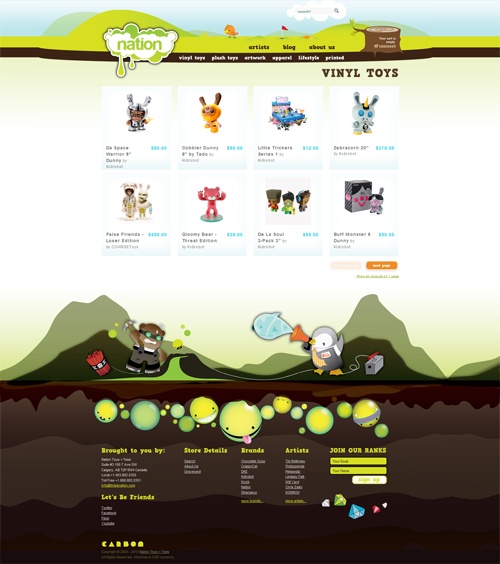
Nation Toys

Best Ways to Planning your E-Commerce Website

Nation Toys is an excellent and colourful site that compliments the vibrant products they sell.

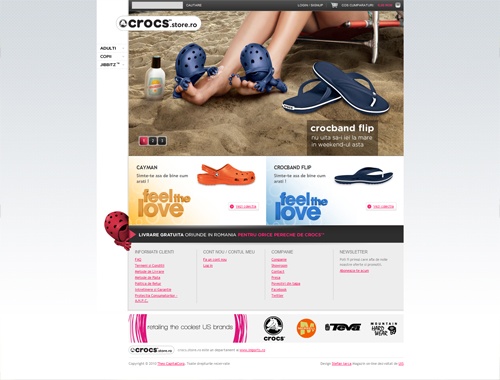
Crocs Store Romania

Best Ways to Planning your E-Commerce Website

Crocs Store Romania is probably the best version of the Crocs site (for some reason they have designed the sites differently for each region).

Mock-up and Design

Once you’ve done your planning, what do you do next? Well, everyone works a different way, but you may want to make a mock-up or wireframe of what your site will look like. Some people like to go straight into Photoshop or other design software at this stage, but personally I like starting out with pencil and paper (very old fashioned, I know) because  it’s easier for me, but it may be different for you.

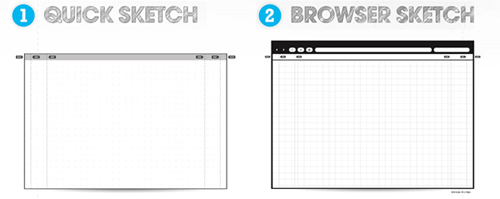
If you do decide to start out the old-fashioned way, try Paper Browser: You just print out the templates and draw on them, giving you a true perspective on paper.

Best Ways to Planning your E-Commerce Website

Continue Reading

Thursday, February 24, 2011

10 great iPhone apps for business users

2 comments

Top 10 Best iPhone AppsGreat business always be the right apps, great iPhone apps for business users. As a member of the nomadic business class, I appreciate how Apple has managed to make a device as small as the iPhone a truly useful enterprise tool. Thanks to the wildly successful App Store, an amazing number and variety of apps promise to keep me organized, on time, on track, and productive even if my ever-present laptop isn't available. The question for me, as it is for most users, is exactly which App Store apps will make the iPhone as useful as it can be.

What follows is my own personal top 10 list, plus a few extras for good measure. If you use your iPhone (or iPod Touch) for business purposes, you'll likely come to rely on a few of these apps too.

[ Take a quick slideshow tour of these 10 great iPhone apps for business users. Discover 30 top iPhone apps for IT pros and must have apps Apple on your iPhone for traveller. ]

There were a few ground rules I used in putting this group together -- guidelines that made sense to me, as I think they will to a lot of other users. First, because I'm living inside the current economy, I wanted the applications to be as inexpensive as possible. A bargain-priced iPhone app that requires an expensive desktop app or subscription was at a serious disadvantage.

Second, I wanted my iPhone software to work, to the greatest extent possible, with software I was already using on my laptop. I know that this introduces some biases, but the companion services and applications I'll mention are popular and widely adopted, so this is not as great a limitation as it might otherwise be.

great iPhone apps for business users

Finally, there are more than 100,000 applications available on the Apple App Store. I didn't try them all. I didn't even try to try them all. I talked to other users, peered over the shoulder of iPhone-wielding business folks, and read reviews, articles, and blog posts from as many people as I could to narrow the field -- pretty much the same process most business users go through when selecting software. The following list of applications, then, is the one I've come to depend on. I'll look forward to reader comments telling me what I've missed.

Dropbox
When you need to move files back and forth between two (or more) computers on the same desk or in the same office, you have a number of options. When you need to move files between devices in different states, your options are rather more limited, and most of those options are in the cloud. One of the most popular for desktop computers is Dropbox, which is now available for the iPhone.

With Dropbox, you designate a desktop folder or subdirectory to synchronize, and then sit back and let the cloud-based storage system do its thing. On the iPhone, Dropbox allows you to upload and download files, and it provide links to individual files for collaborators to share entire subdirectories with coworkers. Dropbox also lets you view common file types like documents, spreadsheets, and photos.

For a business user on the go, the ability to provide the link through e-mail is critical, and the ability to view the files can be a lifesaver. In my case, I was already using Dropbox as a way to share files between my Macintosh and Windows machines, and the Web-based interface allowed me to reach my files when I was away from any of my computers.

There are other file sharing and cloud storage systems out there, but Dropbox works beautifully across a variety of platforms and has proven to be reliable over long spans of time. A free account comes with 2GB of storage, and you can upgrade to paying accounts that include 50GB ($9.99 per month) or 100GB ($19.99 per month) of storage.

Price: Free | iTunes link

Evernote
Ask many Windows users who switch to the Mac which application they miss the most and they'll cite OneNote. Microsoft's note organizer and personal database is a stellar product for anyone who lives and breathes data and notes. Since OneNote is not available on either the Mac or the iPhone, alternatives are important, and the best replacement I've found is Evernote.

Evernote is another product that has clients available for Macintosh, Windows, and iPhone platforms. With the software installed, you can take notes on any of the three devices and share them with the other two. While the Windows and Mac versions of Evernote have solid tools for creating and storing the notes, the iPhone version builds on those tools with additions like easy voice notes and location awareness for notes made on the iPhone.

I can't say that Evernote is perfect -- I dearly wish there was a way to nest organization levels for notebooks -- but it's quite good. The standard (free) subscription allows you to upload 25MB of notes each month; a premium subscription ups that to 500MB per month. Either way, Evernote on your iPhone and primary computer will allow you to easily create notes on either and share them between platforms. For those of us constantly looking for information that we know we once knew, it's an essential tool.

Price: Free | iTunes link

Documents to Go
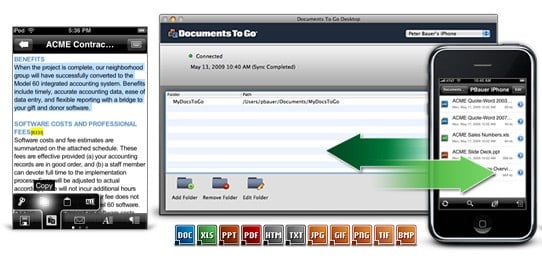
Like it or not, dealing with files in Microsoft Office formats is part of business life for pretty much everyone. Looking at Office documents is the less difficult piece of the puzzle; Dropbox offers that functionality. But for editing and creating Office-format content, you want Documents to Go. Two versions are available.
great iPhone apps for business users

The standard version ($9.99) allows you to work on Word and Excel files that you create on the iPhone or transfer from your computer by synchronizing with a specific, designated folder. Moving to Documents to Go Premium ($14.99) adds the ability to create and edit PowerPoint files, and it lets you edit Word, Excel, and PowerPoint files attached to Exchange or Gmail e-mail.

Even if you don't e-mail Office documents as often as I do, this is a case where it's easily worth spending the extra $5 for the Premium application. Rational people won't spend a lot of time writing lengthy dissertations on the iPhone, but it's nice to know that small changes and edits can be made from anywhere you happen to be. With a little thought and planning, Documents to Go and our next product, NTRconnect, can get you access to any of your Office-bound files from anywhere your iPhone can get a signal.

Price: $9.99 | iTunes link

NTRconnect
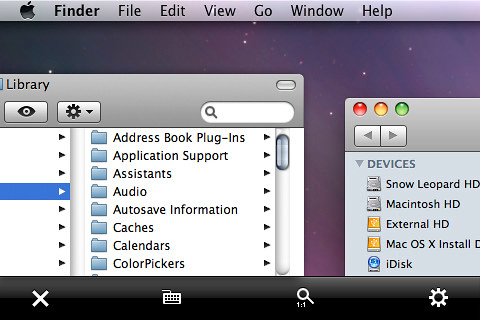
The iPhone is a great platform, but there are times when you require the functionality of a personal computer. When you need to reach out and touch your computer from far, far away, NTRconnect is your ticket. There are two versions of the program, NTRconnect Free, which gives you remote access to two computers (Windows, Mac, or Linux), and NTRconnect Pro (starting at $6.95 per month), which allows you access to as many computers as you'd like, along with features like file transfer and local printing of remote files.
great iPhone apps for business users

For my purposes, the free version worked very well, allowing me to reach both Windows 7 and Macintosh computers that were running various applications. Loading up the required apps on each machine is simple, and the apps are lightweight, though I can imagine circumstances where you'd want to move to the pro version. If you manage a large number of servers, then the pro version will be a requirement, as it will be if you want to leave computers turned off and have the iPhone switch them on when you interact with the system.

For most small-business users, though, the free version of NTRconnect should do the job. Using it, I can launch a browser with Gmail and e-mail any file on the remote computer to my Google account, where I grab the attachment with Documents to Go Premium. For a mobile professional, it's a system that works beautifully.

Price: Free | iTunes link

GeeTasks
I hate to admit it, but I am more productive when I have a task list to keep me moving forward. I've used, over the years, tons of tools (both paper and electronic) to help me with this, and I've found that having an easily portable system is crucial. Because I'm lazy, I also want something that integrates with the rest of what I do so that I'm not scattered in 93 different directions when I try to remember where I wrote something. Google Tasks covers most of what I need from an electronic task list, and GeeTasks is a fine way of keeping my Google Tasks in front of me when I'm moving around in the world.

With GeeTasks I can look at tasks created on my computer, mark them complete, and create new tasks with due dates. If I have multiple task lists (for the multiple roles I play), GeeTasks can show all of them and allow me to easily work among them.

If I'm away from a connection to the Internet (say, on an airplane), then GeeTasks will still allow me to make changes to the tasks on my lists and then sync those changes when I'm next connected to the Net. In all, the limitations of GeeTasks are the same ones inherent in Google Tasks. If you're willing to live with those, then GeeTasks is a very good way of keeping me on task and on target.

Price: $2.99 | iTunes link

Scanner Pro
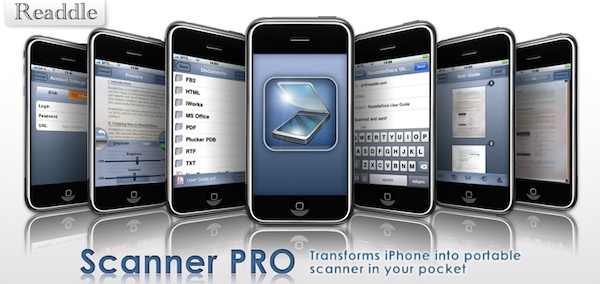
OK, a confession: I dislike dealing with most business paper. I'd much rather have the information in electronic form, where I can search for it, store it, index it, and use it in various useful ways. To turn paper from on-the-road pocket clutter to useful information takes a scanner, and Scanner Pro is a great way to do so using an iPhone.
great iPhone apps for business users

Using Scanner Pro is simplici ty itself. To capture the image, you point the iPhone's camera at the item you'd like to scan, and press the shutter button. You're then given the chance to edit the image by changing color for grayscale or adjusting the brightness and contrast of the scan. Finally, Scanner Pro prompts you to send the image to one of four places: an Evernote note, a Dropbox file, an e-mail message, or a file on any WebDAV server.

If you don't have a WebDAV server, that's OK -- Scanner Pro has help screens that tell you how to use WebDAV to transfer images directly from the iPhone to a Mac or Windows computer. The instructions are simple and the process quick, so the captured scan gets off the iPhone as rapidly as possible.

Scanner Pro is a very good way to capture the "I hope I remember that" images that are constantly cropping up on business trips, and it's a great way to grab images of receipts to accompany expense or activity reports. You learn that you have to carefully watch the iPhone's screen to make sure the camera's lens is parallel to the thing being scanned, but with a little practice the scans work well and are good enough to keep accounting off your back.

Price: $4.99 | iTunes link

FTP on the Go
I wasn't always a Webmaster, but maintaining a Web site has become part of my regular business life, as it has for thousands of people in countless large and small businesses. When you need to get an image from your iPhone's camera to a Web site, or quickly replace that file displaying an actionable typo, nothing works like FTP. There are several FTP clients for the iPhone, but FTP on the Go is a solid, no-fuss client that allows you to transfer files as well as create directories, delete files, and perform all the other server-based file management tasks we've come to expect from a personal computer FTP client.

great iPhone apps for business users

FTP on the Go is simple to set up and use, but it also has a ton of advanced features, ranging from a text editor (handy if you need to quickly correct a Web page) to a wide variety of security options to the ability to let others use FTP and grab files from your iPhone.

Though FTP on the Go is superb for taking care of a basic business maintenance function, it is also a sophisticated piece of software that turns your iPhone into a serious tool for managing files and Web sites. If you maintain your own site or part of your job description includes site maintenance, the day will likely come when an FTP server is a job-saving tool. When that day arrives, FTP on the Go is a must-have application in the palm of your hand.

Price: $6.99 | iTunes link

BizExpense
Here's another confession: I hate doing expense reports, as does everyone I know. I'm not sure whether BizExpense makes doing expense reports any less onerous, but it does make it much easier to keep up with the process on the road so that I don't have to spend a day remembering what I ate on that last trip.

BizExpense allows you to keep records for multiple employers and many different expense types. A basic screen prompts you to enter details of the transaction, from expense type to payment method, in addition to amount and currency. There is also space for notes (who you took to dinner, for example) and for attaching a receipt, either by using the iPhone's camera from the BizExpense application or by attaching an existing photo from the camera roll.

great iPhone apps for business users

You can look at a chart showing expense types and how much of the trip's cost has gone into each one, and when you're finished with the trip BizExpense will e-mail a completed report (in Excel spreadsheet format) to any address you choose. The report can be e-mailed via local service or an external SMTP server, but attached receipts can only be sent via the external server.

I found that expenses are easy to enter and reconcile, and the resulting spreadsheet is simple to copy and paste into other formats if accounting won't take the BizExpense file. There are a number of App Store applications that say they do expense reports, but BizExpense seems to have the best combination of features without requiring you to subscribe to an external service.

Price: $4.99 | iTunes link

pTerm
There are times when nothing but a green screen will do. Whether you're trying to remotely manage a piece of network infrastructure or simply need to kick-start a server, basic data terminals are still the right tools for a surprising number of applications. When one of the green screen times crops up while you're away from a convenient computer, pTerm is an in-your-hand way to VT-100 happiness.

 great iPhone apps for business users

As with FTP on the Go, you can get to work with pTerm by simply giving it the basic log-in instructions for the server or device you need to reach. If you dig just a little deeper, though, you find that you have the ability to fine-tune pTerm's behavior to an amazing extent, with settings ranging from how the software deals with passwords in log files to proxy and encoding options to whether and how pTerm copes with tunneling protocols.

In the final analysis, pTerm is a surprisingly sophisticated tool for taking care of an incredibly simple job. For those who deal, even occasionally, with terminal-based user interfaces, it is a superb tool to keep in your iPhone's toolbox.

Price: $4.99 | iTunes link

TripIt
I've tried to keep away from applications that require subscribing to a service, but there are times when it's unavoidable. GeeTasks, Dropbox, and Evernote all have components in the cloud, and keeping up with your travel details is, I think, also a good fit for the cloud.

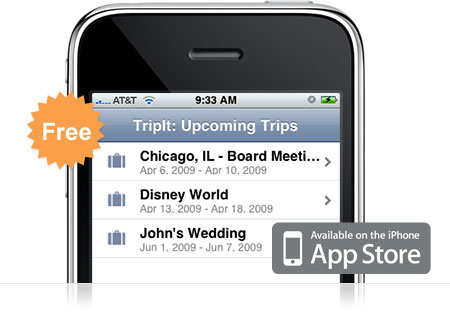
I've found TripIt to be a useful service for keeping up with my travel, as well as the travel of my colleagues and business associates, so I was pleased to find the TripIt iPhone app. When it comes to keeping up with my flight numbers and times, hotel and rental car reservations, and the like, TripIt on the iPhone is quite sufficient. And because it takes its info from the data I enter on the TripIt Web site, no additional effort is required.
great iPhone apps for business users

That said, I'm hopeful that future versions of the software will have more functionality. Right now, for instance, TripIt for iPhone only keeps track of my travel -- it doesn't include the "keeping up with my colleagues" information at all. It needs that. It also offers to send me push updates if schedules or travel details change, but only if I upgrade to the premium edition of the software (how much?).

TripIt does something I need, and it gets the basics right, but its inclusion on this list is based, at least a bit, on the hope that it will come closer to the full functionality of the service in future versions.

Price: Free | iTunes link

And that's not all
While the basics of business are covered by the applications already noted, there are a few other tasks that are nice to cover and that iPhone apps deal with nicely. Among those I use most often are:

Graphing Calculator. GraphCalc is a nice graphing calculator application that has everything I need (except Reverse Polish Notation). Price: 99 cents | iTunes link

iBlogger. When I need to blog without my computer, this app, from the people who wrote the Mac blog tool Ecto, is my tool of choice. Price: $9.99 | iTunes link

Dragon Dictation. When I need my hands for other things and want to dictate a note, tweet, blog post, or e-mail, Dragon Dictate lets me do it. This doesn't have the same sensitivity and accuracy as Dragon Naturally Speaking, but it's surprisingly good given the relatively low power of the iPhone platform. Price: Free | iTunes link

myStarbucks. I can remember my own coffee order, but when I travel I sometimes just want to know where the nearest Starbucks is, and this app tells me. When an iPhone app can lead to latte and Wi-Fi, it's a very good thing. Price: Free | iTunes link

Continue Reading

Pocket Manager-Small Business Guide: Unlocking the Educational Potential Howto’s

0 comments

Pocket Manager-Small Business Guide: Unlocking the Educational Potential Howto’sChicago, IL - Intersog LLC, a leader in mobile application development, has announced a newly upgraded version of Pocket Manager –Small Business Guide is now available for the iPad.  A Top 25 grossing Business app, Pocket Manager –Small Business Guide provides affordable, portable business education, vital to busy entrepreneurs and small business owners.  Pocket Manager. The Pocket Manager series apps are pretty good. I have been checking out Pocket Manager Business Essentials and it is a very nice app.

Maybe not as in-depth on some marketing topics I am looking at, but very nice well rounded business information. A video for the Business Essentials iPad app will be coming soon. CM

Pocket Manager-Small Business Guide: Unlocking the Educational Potential Howto’s

Pocket Manager-Small Business Guide: Unlocking the Educational Potential Howto’sPocket Manager-Small Business Guide: Unlocking the Educational Potential Howto’s

Chicago, Illinois – Intersog LLC, a leader in mobile application development, has announced a newly upgraded version of Pocket Manager – Small Business Guide is now available for the iPad. A Top 25 grossing Business app, Pocket Manager – Small Business Guide provides affordable, portable business education, vital to busy entrepreneurs and small business owners. Pocket Manager – Small Business Guide is available on the iTunes App Store.

Pocket Manager – Business Essentials iPad is a full-featured business course logically divided into 3 distinct sections: course, flashcards and tests. The full-text course book contains 10 chapters, providing a roadmap for running a successful small business, with topics ranging from financing and marketing to operations and accounting. A handy bookmarking feature allows users to save their place anywhere in the course and to resume from that point upon restart. And to help users with terms they may not understand, a course glossary is provided for easy access to definitions from within the app.

After the course text is completed, users have access to a set of interactive flashcards designed to prepare them for the in-course tests. Comprehensive tests follow each chapter, designed to reinforce the learning process. Detailed explanations are provided for each right or wrong answer and tests can be saved and retaken, so users can track their learning progress.

Device Requirements:
* Compatible with iPad
* Requires iOS 3.2 or later
* 1.9 MB

Pricing and Availability:
Pocket Manager – Small Business Guide course 1.0 is $39.99 USD (or equivalent amount in other currencies) and available worldwide exclusively through the App Store in the Business category.

Intersog
Pocket Manager – Small Business Guide 1.0
Purchase and Download
Screenshot 1
Screenshot 2

Located in Chicago, Illinois, Intersog is an international software construction company with extensive expertise in software product development. Intersog specializes in complete product life cycle that utilizes a partnership approach to client engagements. Intersog is focused on emerging technologies for mobile enterprise applications and LAMP. Copyright (C) 2010 Intersog LLC. All Rights Reserved. Apple, the Apple logo, iPhone, iPod and iPad are registered trademarks of Apple Inc. in the U.S. and/or other countries.

Continue Reading

8 Educational iPhone Apps for Small Business Owners

0 comments

Top 10 Best iPhone AppsEducational iPhone Apps for Small Business. With more people using smartphones, companies can take advantage of mobile training options. Here are a few possibilities to consider. Companies are always looking for effective and efficient ways to conduct training. We all know training is important and essential for growth. For many companies, it’s about finding the right programs at the right price and being able to deliver them without completely disrupting the operation. Education iPhone Apps  Top Education iPhone Apps Reviewed, 2011. Book iPhone Apps · Business iPhone Apps. Education iPhone Apps

Technology has helped to change the way we view training. What, in the past, could only be delivered in a classroom has moved online. And now with more people using smartphones, companies can take advantage of mobile training options. Educational on iPhone Apps for Small Business Owners.

Educational iPhone Apps for Small Business Owners

Here are a few possibilities in the mobile learning app area to consider.


1. Learning To-Go by INTERSOG


Educational iPhone Apps for Small Business Owners

INTERSOG offers a wide variety of apps including Pocket MBA, Pocket CFO, Pocket Manager, Full Business Learning Course, Full Finance Business Course, and Dictionaries of Business Terms. Courses include a course book, flashcards and tests.

Cost: Ranges from free to $9.99


2. Sandler Training


Educational iPhone Apps for Small Business Owners

Sandler offers sales and sales management training via its mobile app. The product can stand alone or be used as a supplement to its training system. A free app is also available with limited content.

Cost: $4.99


3. Skill-Pill


Educational iPhone Apps for Small Business Owners

If you’re in the market for something that can be customized, Skill-Pill (a free app with paid content) provides two-minute videos (called “pills”) on a broad spectrum of business topics (100+ topics available). The “pills” are designed to reinforce concepts that a person already knows. Companies can create customized content, use generic content that is already available or a combination.

Cost: Free app, paid content


4. Lynda.com


Educational iPhone Apps for Small Business Owners

Some mobile learning apps provide a portal to their existing content libraries. For example, Lynda.com offers an online training library in 3D, audio, video, photography, graphic design, web and interactive design, business and development. It is a subscription-based service with monthly and annual options. The app is free and allows users to access the online content from their subscription.

Cost: Free, but you must have a Lynda.com subscription


5. CellCast Widget


Educational iPhone Apps for Small Business Owners

Another app that provides a portal to online content is CellCast Widget. The app integrates access to the Onpoint Digital mobile library, which contains hundreds of topics such as change and innovation, sales and marketing, leadership and management.

Cost: Free


6. Busuu


Educational iPhone Apps for Small Business Owners

If you’re looking for language training, the busuu language community offers free online courses in English, Spanish, French, German, Italian, Portuguese and Russian. The free version has 20 complete learning units and additional paid content is available. The app also provides opportunities to practice in their online community. The busuu Language Apps cover vocabulary, key phrases and everyday topics from the beginner level to advanced.

Cost: Free


7. Curatr


Educational iPhone Apps for Small Business Owners

Want to use your own content? No problem. Curatr is an online learning platform that transforms your e-learning into a social game. An enterprise edition is available for a fee.

Cost: Free (basic edition)


8. Cisco WebEx Meeting Center


Educational iPhone Apps for Small Business Owners

Many people already enjoy the learning options available via WebEx meetings. Don’t forget you can bring those features to your iPhone using the Cisco WebEx Meeting Center.

Cost: Free


BONUS: iTunes U


iTunes U offers programs from some of the top colleges and universities around the world. Some of the programs include the Ohio State University’s Lunch and Learn Series on Wellness, Yale University’s course on Financial Markets, or Stanford’s Entrepreneurial Thought Leaders series.

The introduction of mobile learning apps doesn’t mean classroom training is dead or dying. Training decisions are very specific to each individual business and its needs. It does mean business owners have more options and that will only benefit organizations.

Are you using any iPhone apps for training? Let us know in the comments.

Continue Reading

Wednesday, February 23, 2011

Must have iPhone Apps for Businessmen

0 comments

Top 10 Best iPhone AppsNow iPhone has become the need of all business men and even more after the RIM’s BlackBerry services issue in India. Though the phone comes with a lot of features and custom care services, still there’s always something or the other thing to satisfy the demand of people. Thanks to iPhone’s app store, which has so many apps that can help to satisfy them. Last time while talking about iPhone on Extreme Trix, we shared about Powwownow, an app, which can help you to do free video conferencing on your phone. Well, that post created a craze among iPhone users so, we thought to share a complete list of the best iPhone apps for a business man and here are they :

QlikView

Now you don’t need to visit a consulting company or whatever they call them! To know whether something is good for your business or not or what should you do to get a better PR? Everything’s a click away after installing this app, moreover you could even get some business intelligence ideas from it.Must have iPhone Apps for Businessmen

FTP on the GO

Do you own a website or blog or are you a Web Designer? If yes, then it’s a must have application for you. As anything can happen anytime to your website when you are on go, the web site may get broken, you could fix it, but you aren’t at your desk, then what would you do? As this app has all features as a Desktop FTP client has so, can help you.

Air Sharing

Tired carrying those bulky hard drives with you to keep your data safe and always with you? I am sure being a business you would have. Now the technology has changed and even time too! Get a copy of this app from iStore and get access to all your files from your Hard Drives, Amazon S3, Dropbox, Apple’s Mobile Me and even you could view, search, read and print them!

Good Reader

Well, I am pretty sure that you being a business man have to go through various kinds of documents. Isn’t it? No need to install a special new application for each and new type of document (format). Good Reader can help you out to read, show all kinds of documents including HTML and PPT.

iTimes Sheet

the thing which a client looks in your service is that how fast can you complete a project? This application could help you a lot in time management. It is a must have for consultants, project managers, freelancers or for people who want to know what they did and how they spend their time. One of its best feature is that you can easily export data from Excel.

1Password

Do you carry some confidential data on your iPhone? You may be. Then without security, it’s quite risky to do so. Get this award winning app installed on your mobile and feel safe. You need iOS 3.1 or later to install it.

We hope that you liked the list of our application. Did we forget any? If yes, drop it down via comments, we’ll add it too!

Continue Reading

Peek iPad 2 and iPhone 5 – things you need to know about

0 comments

Most Wanted GadgetsAs we approach the time when Apple is expected to launch two of its flagship products for 2011 — the iPhone 5 and the iPad 2 — the rumors around the company, its plans, the products’ features and the launch dates are entering a frenzy matched perhaps only by high profile celebrity rumor mills. Be the first to know about iPad 2 and iPhone 5, the legendary Apple machine to compete most wanted gadget 2011. The rumored iPad 2 release delay could mean that Apple has changed its mind about a number of factors regarding its tablet plans in response

The Apple rumor economy has always been fascinating. More so than any other company, people obsess over little tidbits of information which may be true, may be half true, may be half false, or may be totally made up.

The 5 Stages of Apple Rumors

It is at this point that, to paraphrase the legendary post-modern saying, the rumors get so intense that everything is pointless. Even if you’re closely following Apple, which keeps its secrets behind a tightly locked 10-inch-thick steel door, it’s getting hard to track every single rumor about the upcoming products, and it’s even harder to discern which of them could be true.

Peek iPad 2 and iPhone 5 – things you need to know about

We cannot be certain what features the iPhone 5 and the iPad 2 will have. Hell, we don’t know for sure that these products even exist. The rumors themselves, however, follow an interesting set of patterns that seem to reappear every time an Apple product is about to be launched.


1. The Age of Innocence


At this early stage, actual products are several months away, and the only palpable data anyone really has is the timing of Apple’s yearly events, such as the Apple Worldwide Developer Conference. It is also at this time when the rumors actually make the most sense, as analysts and media outlets take the obvious picks. The new iPhone, you will often read at this time, will have a better camera, a faster processor and more memory.

Well, duh. The features sound good, but they’re also so obvious that anyone could’ve predicted them. While the predictions at this stage are often correct, they only point toward an evolutionary product release, which Apple often does.


2. The Advent of 3D Models


Peek iPad 2 and iPhone 5 – things you need to know about

This is where the 3D Studio Max and Illustrator wizards take the matter into their hands. Why wait for the official pictures of the new devices when you can imagine them yourself, thinner and more beautiful than they can ever be in reality?

The models get better as the first images that relate to the new product start to trickle onto the Internet. A case seemingly designed for the next generation of iPad will set a whole new wave of 3D model creation in motion, and soon we’ll have some models that look like they could be the real thing. But the real thing, as it almost invariably turns out, is often so much more perfect than any 3D model could be. The images you see at this stage of the Apple rumor mill will be enough to sate your brain for a little while, but you will forget them all the second Apple shows us the actual design.


3. The Stage of Wild Predictions


We have recently entered the third stage, perhaps the most tiresome of them all. Rumors abound at this time, and it is no longer enough to go with the obvious picks; if you want to start a good rumor, you have to go for something wild. The new iPad will not have a camera, and Apple is about to release a very, very small version of the iPhone that needs to be installed under your skin — these are the type of rumors you are likely to encounter at this time.

One could also call this stage the Age of Opposites. Everything you thought was true might be wrong, or so you will be told. Is the new iPhone really a phone? Has Apple completely given up on the concept of data storage? Just like in George Orwell’s 1984, you will learn to doublethink — two completely opposite concepts will suddenly start making sense in your head. And this is the perfect setup for…


4. The Dark Age of Chaos


Peek iPad 2 and iPhone 5 – things you need to know aboutYes, this is the time when tech media journalists get physically sick when they hear words starting with “i,” while the readers repeatedly bash them for being Apple fanboys. The rumors have stopped making sense a long time ago, but you still cling onto them. With a mad look in your eyes and a hint of a snicker on your lips, you refresh the Google Reader on your iPad, looking for a new glimmer of hope on that 8-megapixel iPhone camera you’ve been craving.

The worst part is that this is when some data about the upcoming products actually leaks. Now you have to change everything you’ve believed in, but are you strong enough to do that? Isn’t it easier to just keep on living the dream in which the next iPad has a 2 GHz quad-core CPU, more RAM than your desktop computer and a screen with more pixels than the current state of technology can possibly allow?


5. The Silence Before the Storm


The time is near. Apple has actually set a date, and now most readers, analysts and media outlets are collectively: a) sick of predictions and, b) explored every possible rumor avenue. It is now pointless to fabricate any new rumors, and even if you do, the actual product launch is so close that the exhausted Apple fanbase is more content to wait for the real thing than to live in the fantasy world.

This is, by far, the most rewarding part of being a journalist and a tech media reader: finally, you get some well-deserved rest. We’re not quite here yet, but when we do reach this point, do yourself a favor: have a night out, drink a couple of drinks, forget about Apple. The truth will be revealed soon, and you’ve earned it.

Continue Reading

Monday, February 21, 2011

Top Best Android Apps for Business Must Have 2011

0 comments

Top Best Android Apps Must HaveTime is precious and all business entrepreneurs will undoubtedly agree with the fact that time is money. Gadgets and technology get together. This year, sales of smartphones based on Google's Android operating system have begun to surpass Apple's iPhone in the U.S., according to Nielsen. With increasing interest in Android handsets, mobile application developers are starting to make business-specific apps. Here are 10 apps from Google's Android Market, selected with the help of Google, that are popular and highly rated (on a scale of 1 to 5, with 5 the highest) by users.

When you are looking for a smartphone other than an iPhone, the Andoid smartphone might be the one you're looking for. Cellular South reveals the best Android apps for business and reminds users that Android is also for professionals. The choice of apps for the Android mobile operating system is bewildering, so Jason Hiner picks out some of his favourites. If you own an Android smartphone, you can make your life a lot easier with apps that enhance your business productivity while you're on the business ecommerce.

Top Best Android Apps for Business Must Have 2011

Documents to Go 3.0 (DataViz)

Free viewer; $14.99 for full version
Rating: 4.5 stars
View, edit, and create Microsoft Word, Excel, PowerPoint, and Adobe PDF files. If you want to edit or create files, you'll need to buy the full version.

Top Best Android Apps for Business Must Have 2011

PocketCloud (Wyse Technology)

Free for limited features; $14.99 for full version
Rating: 4.5 stars
Access Windows, Mac, or Linux desktop files and applications from your handset. It's free to use with home machines, but workers who want to use this with a corporate computer on a network need to buy the full version.

Top Best Android Apps for Business Must Have 2011

Ignition for Android (LogMeIn)

$29.99
Rating: 4.5 stars
Your computers become an extension of your Android smartphone with this app. Remotely access and control both work and home computers, as long as they're connected to the Internet.

Top Best Android Apps for Business Must Have 2011

UPS Mobile App for Android (UPS)

Free
Rating: 4 stars
Track packages or freight shipments from your handset and estimate shipment costs and delivery times. This app also lets you access your address book and payment info at UPS.com and find the nearest UPS service locations.

Top Best Android Apps for Business Must Have 2011

TouchDown (NitroDesk)

Free 30-day trial; $19.99
Rating: 4.5 stars
Workers can connect to corporate e-mail with Android devices and get new e-mail messages pushed to smartphones rather than needing to remember to download messages. TouchDown supports encryption, and the IT department can wipe data on the device should it be lost or stolen.

Top Best Android Apps for Business Must Have 2011

Astro File Manager (Metago)

Free; $3.99 for app with no ads
Rating: 5 stars
This app helps you copy, move, delete, and rename files on your smartphone. It also lets you send files as attachments to e-mail messages and read and extract compressed files, such as Zip and Tar files.

Top Best Android Apps for Business Must Have 2011

Evernote (Evernote)

Free
Rating: 4 stars
Evernote helps you remember things, whether it's a receipt from that last business dinner or the name of the executive you met at a conference. The app lets you type a text note, clip a Web page, snap a photo, or grab a screen shot and store it, organize it, and find it later.

Top Best Android Apps for Business Must Have 2011

Travel Organizer (TripIT)

Free
Rating: 4 stars
When you're on the road, you can see the details of your itinerary, get maps and directions, and make phone calls straight from your itinerary with the tap of a finger.

Top Best Android Apps for Business Must Have 2011

Expense Reports (Expensify)]

Free
Rating: 4 stars
Never lose another receipt. Log expenses, scan receipts, and take comfort that a free service will back up those receipts online. This app also lets you import expenses and receipts from your credit-card or bank account.

Top Best Android Apps for Business Must Have 2011

Dropbox (Dropbox)

Free
Rating: 4.5 stars
Sync files between your computers and mobile devices. Share links to files and save photos and videos from your camera to your computers. This app also lets you browse a Dropbox folder from your handset.

Top Best Android Apps for Business Must Have 2011

Admittedly, I feel more confident downloading apps from the Apple store than I do from the Android Marketplace because I know that Apple strives to protect. Cellular South Touts Android Apps for Business Users The software can business users the possibility to easily find the most useful and fun Android apps available today. Top 15 Android Business Apps Highly useful Andriod apps for a wide variety of business tasks, from travel aids to financial transactions to office productivity.

10 Must-Have Android Apps for Business Whether you're running the next great business pitch from your phone or you just need to jot down ideas and edit documents on the go, we have you covered. 101 Best Android Apps in Business Here are the results for 101 Best Android Apps in Business on 101 Best Android Apps. Vote for your favourite applications.

10 must-have Android apps for business  Whether you're running the next great business pitch from your phone or you just need to jot down ideas and edit documents on the go business online. 11 Must-Have Android Apps for Business Among all the apps pouring into Google's Market, here are a few notable gems.

Continue Reading


Copyright 2010 All Rights Reserved | Super Template by Ilmu Komputer | Modified by Ilmu Grafis | Original Wordpress theme by Ahli Desain