Showing posts with label BlackBerry. Show all posts

Monday, February 28, 2011

Blackberry Tips and Trick Must Have

0 comments

Blackberry Tips and Trick Must HaveTop Best BlackBerry Tips All of Time Tips Blackberry Blog about Tips Blackberry Top Best BlackBerry Applications All of Time Tips and Trick Latest Blackberry. transferred their smartphone affections to the iPhone, there are many of us still rocking the BlackBerry. I don't claim to be a BlackBerry expert, but I have come across a few tips and tricks that will make any user's life easier and more entertaining.


1. Use the keyboard less

BlackBerry has always had a QWERTY keyboard and you can type everything out in full - but you can save time with the built-in shortcuts. Press space twice at the end of a sentence to get the full stop and an automatic capital on the next word.

Don't bother with apostrophes in words like I'm and isn't (type im and the BlackBerry will correct it for you); there are other handy abbreviations like 'wel' to get 'we'll' and 'il' to get 'I'll' and you can add your own with Options > AutoText.

Blackberry Tips and Trick Must Have

AUTOTEXT: Speed up typing by creating your own abbreviations and corrections

2. Quick capitals

You don't need Shift - press and hold a letter key to type the upper case letter.

3. Skip Symbol

If you're typing an email address into a field that expects an email address, don't bother looking for how to type the @; just hit space and BlackBerry with put the @ in for you. Press space when you need the . in the middle of the email address and it will fill that in, too. Do the same for URLs in the browser; pressing space fills in the periods faster than typing them by hand.

4. Fast select

There's a Select command on the menu for choosing what to copy and paste - but you can make a selection just by holding down the Shift key as you scroll the trackball.

5. Keyboard shortcuts

Save on scrolling by using 't' to get to the top of any email message, web page or other long screen and 'b' to get to the bottom. There are specific shortcuts for all the built-in apps like using the Mute button to pause videos or music or skipping to the next or previous track by pressing and holding the volume up and down keys (which also zoom in and out in the camera - although many apps use I and O to zoom); there's a list in the Help tool.

Blackberry Tips and Trick Must Have

SAVE TIME: Put the keyboard to work with shortcuts in every built-in app

6. Choose dialling or shortcuts

Under Options > Phone Options > General Options you can set Dial From Home Screen to Yes or No; if you set it to Yes you can start typing a name to dial the number on the home screen, if you set it to No you can type the first letter of apps on the home screen to open them (M for Mail, B for browser, C to compose email - and oddly N for Messenger, L for Calendar and U for Calculator).

7. Web columns

Press Z in the web browser to reflow the page into a column the size of the BlackBerry screen so it's easier to read; press Z again to go back to a normal page view you can scroll around.

Blackberry Tips and Trick Must Have

EASY READING: Switch between seeing the original layout and a version of the page reformatted as one long BlackBerry-sized column

8. Turn on JavaScript

To save memory and make pages load faster, the BlackBerry browser usually has JavaScript turned off by default; use Options > Browser Configuration > Support JavaScript to turn it back on and make more pages load correctly.

9. Which browser?

There are three different browsers on the BlackBerry; a WAP browser for viewing content from your mobile network, the BlackBerry HTML browser (and a hotspot browser that prioritises the Wi-Fi connection). If you have problems accessing or loading Web pages, choose Options > Browser Configuration and set Browser to BlackBerry Browser and make sure Options > General Properties > Default Browser is also set to BlackBerry Browser.

10. Don't get mobile Web sites

You can also try changing Browser Identification from BlackBerry to Firefox or IE to force the full versions of specific pages to load instead of the cut-down mobile versions - but they might be slow or not load fully.

Blackberry Tips and Trick Must Have

BROWSER SWAP: The BBC web site always loads the mobile version on BlackBerry; if you want to see the full site, have your BlackBerry pretend to run Firefox or IE

11. Fast search

You can search for contacts, messages and inside files and web pages - press S to search in contacts and messages and F to search in other apps.

12. Color-code messages

If you get both work and personal email on your BlackBerry, you can change the color of either set of messages. Choose Options > Security Options >Information> Message Outline Colors and either Enterprise Messages or Other Messages.

Blackberry Tips and Trick Must Have

COLOUR-CODED: Show work and personal messages in different colors

13. Menu multi-tasking

BlackBerry has had multitasking for years but it's subtly done; apps stay running so you can switch back to them (unless you run out of memory when they're closed automatically). To get back to another app, press and hold the Menu button to get the task switcher.

14. Lock with mute

Some BlackBerrys have both a lock and a mute button on the top edge, others - like the original Bold - only have a mute button. You can always lock the screen by scrolling down to the Lock icon but it's faster to just press and hold mute until the screen locks (do the same to unlock it).

Here Are The Top 10 Basic Blackberry Tips And Tricks In No Particular Order Top BlackBerry Problems Solutions Top 10 Basic Blackberry Tips And Tricks from. BlackBerrys have a lot of settings hidden in the OS. Here are some of the most popular BlackBerry Tips for any user. There are some tips you won't need often - like pressing Alt, Del and the right-hand Caps key at the same time to reboot instead of just restarting; others you'll use all the time, like pressing the red 'hang up' key to get back to the home screen and clicking the spanner icon on the home screen to open Options.

15. Real convenience

There are two 'convenience keys' - one on each side of the BlackBerry; you've probably found one of them by knocking it and hearing that irritating 'say a command' message. If you never use voice command, choose Options > Screen/Keyboard to change the buttons to something more useful - starting the camera, opening the music player or launching your favourite app.

Blackberry Tips and Trick Must Have

QUICK START: Put two apps or commands you use all the time at your fingertips

16. Tweak your trackball

Use Options > Screen/Keyboard and scroll to the bottom of the page to choose the horizontal and vertical sensitivity (how far it moves across the screen when you move it) and whether you hear a click as it rolls.

17. Turn off speakerphone

The slightly confusing way to put a call on speakerphone is to use Menu > Activate Speakerphone; the even more confusing way to turn it off is Menu > Activate Handset - or you can use the $ key to turn it on and off. (And the $ key produces the $ sign in email, use Options > Screen/Keyboard > Currency key to set it to £ instead).

18. Say a command

Voice command does more than voice dialling; if you want to check your signal and battery strength you can wade through the Options menu or you can hit the voice command button and say 'status' or 'check battery' and 'check signal strength'.

19. Say it again

Voice recognition works quite well, but you can train it by reading a list of numbers and words; choose Options > Voice Dialing> Adapt Voice.

Blackberry Tips and Trick Must Have

VOICE TRAINING: Choose Adapt Voice and your BlackBerry will ask you to read a list of sample names and numbers

20. Hidden Help

The hidden 'Help Me!' screen shows the signal strength, battery level, device PIN, free space, space in use, IMEI, OS version, how long the BlackBerry has been on and some other info that can be useful for troubleshooting. View it by pressing Alt + Caps + H.

Blackberry Tips and Trick Must Have

MORE INFO: The Help Me! Screen collects key information together

21. Archive, don't uninstall

Only the very latest BlackBerry models have anything like enough memory for all the apps you want. When you run out of space, pick the ones you use least and archive them to your microSD card (this only works with apps from App World). Select the app in the My World sections of App World and choose Menu > Archive; archived apps have a green arrow on their icons and you can click them to reinstall - but you may have to restart to archive or restore an app.

Blackberry Tips and Trick Must Have

ARCHIVE APPS: You can't run apps from the SD card but you can archive them to save space

22. Save power overnight

BlackBerry is very frugal on battery life and you can make it last even longer by having yours turn itself off overnight and back on in the morning. Choose Options > Auto On/Off; you can have different on and off times for weekdays and weekends.

23. Master Control Program

Use the free third-party tool MCP (http://mcpfx.com) for tweaking your BlackBerry, doing a factory reset in an emergency - or just installing updates more easily than with the sprawling and inefficient BlackBerry Desktop software.

Blackberry Tips and Trick Must Have

TWEAK BLACKBERRY: Install a new OS or tweak the modules on your BlackBerry with the excellent Master Control Program

24. Install any app

If you want to run an app that doesn't have an installer - including alternative email clients like Astrasync and NotifySync which RIM won't sign for installation - connect your BlackBerry by USB, switch to mass storage mode so it shows up on your PC as a drive and copy the JAR file to the root folder. On your BlackBerry use the Media app to open the folder and select the JAR file to install it.

25. Save money on texts

If you're sending a message to another BlackBerry user, BlackBerry Messenger is free -but you need to know their BlackBerry PIN.The easiest way to get someone in your contact list is to invite them.

Get BlackBerry Tips, Tricks and Key-Press Shortcuts Learn Read the Top 10 Phone Tips from BlackBerry: This list includes simple tips. BlackBerry Troubleshooting Tips & Tricks from RIM What follows is RIM's recent list of BlackBerry troubleshooting tips. Read our top tips for BlackBerry Bold 9700 if you just got the latest Its the best thing to do closest to what we're used to doing with.

Continue Reading

Sunday, February 27, 2011

Most Wanted Smartphone 2011 By Platform

0 comments

Most Wanted Smartphone 2011 By PlatformWith so many choices of mobile phones, each with similar and yet intriguingly different “operating systems” on offer, which are the key phones, to look out for, on each platform? Here is my take on what’s a good bet for Apple, webOS, BlackBerry, Windows Phone 7, Android, and Symbian operating systems based on what is around at the moment. The most important thing about your next phone isn't what carrier it's on, how big the screen is, or even who makes it. So here are Most Wanted Smartphone 2011 on every platform.

Apple

Most Wanted Smartphone 2011 on Every Platform

There isn’t a lot of choice when it comes to Apple operating systems so the iPhone 4 is the obvious current bet. The iPhone 4 features one of the highest resolution screens currently available on a smartphone, at 960×640, and it manages to fit it into a 3.5” display. The on-board camera can record HD video at 720P with it’s 5 megapixel camera. There are a couple of internal storage items (16GB and 32GB).

However, you might want to hold off until there is news of the iPhone 5. There has been a whisper that news is due in March 2011 (but don’t hold me to it!), Source: Sky News:  iPhone 5 To Be Revealed 2 March. However, from that article the image associated with that particular announcement looks more like an iPad announcement.

What others say: Engadget: iPhone 4 review, “We’re not going to beat around the bush — in our approximation, the iPhone 4 is the best smartphone on the market right now”.

webOS

Most Wanted Smartphone 2011 on Every Platform

Recently picked up by HP the Palm is another one with not a lot of choice which is a shame as it has a great operating system. The current Palm Pre features a 3.1” screen with a resolution of just 320×480. The camera is a 3 megapixel and storage is 8GB. However, the Pre does have a slide out mini keyboard in its favour.

So, the Palm Pre is the one to watch – but you might consider holding off until the recently announced Palm Pre 3, featuring an all new version of webOS, is launched.

What I said: Initial thoughts on the Palm Pre, “The Pre is functional yet lacks that real WOW factor, my theory is that is probably because the App Catalog is so bereft of diverse applications – perhaps the firmware upgrade to 1.2 will open a new world for the Pre?”.

What others say: IT Pro: Palm Pre Review, “It’s slicker than using Symbian, arguably more pocketable than its top rivals the HTC Hero and iPhone and a valuable and valid alternative to the ever-expanding sea of Android phones we seem to be pelted with on a weekly basis these days”.

BlackBerry

Most Wanted Smartphone 2011 on Every Platform

The BlackBerry Torch 9800 boasts the latest revision of RIM’s operating system.  The Torch 9800 features a 3.2” screen (3.18” diagonally) with 480×360 pixels, similar to the Palm Pre. Talking of similarities to the Pre the Torch also boasts a slide-out mini keyboard. The onboard camera is 5 megapixel and storage is made up of 4GB inboard storage and a 4GB media card.

With the latest developments in the operating system the traditionally enterprise-centric BlackBerry range are starting to shine and could be one to watch.

What I said: A Look At The BlackBerry Torch 9800, “Overall the BlackBerry Torch 9800 is an attractive phone that is packed full of features. A little streamlining may be required on the user interface but all in all its a big step in the right direction.”.

What others say: CNET: BlackBerry Torch 9800 review, “There’s not much that the BlackBerry Torch 9800 can’t do, but it doesn’t make it easy. Pricey, chunky, and packed with features, this is a smart phone whose function beats form — and fun.”.

Windows Phone 7

Most Wanted Smartphone 2011 on Every Platform

There are a number of handsets on offer running the all new Windows Phone 7 (and with the recent partnership with Nokia there are likely to be even more).

NOTE! The Phone 7 operating system is in the early part of its lifecycle so be ready for a few teething problems.

However, at the moment the HTC HD7 is well worth a look. Sporting a 4.3” screen with a resolution of 480 x 800 and a 5 megapixel camera on board the HTC HD7 can record 720P HD Video. This is backed up with a 1 GHz processor and 16GB  of internal storage.

What others say: Tech Radar: HTC HD7 review, “We like the HTC HD7 as a phone – it builds nicely on the HD2 without being a complete revamp.The Windows Phone 7 experience is ace on it, and simply just works, which is all we’re really looking for at this early stage.”.

Android

Most Wanted Smartphone 2011 on Every Platform

Whilst other manufacturers like to fiddle with the operating system, adding layers of “functionality” here and there, the Google Nexus S keeps to the essential nature of the Android operating system and features a nifty Super AMOLED screen.

Other features of the Google Nexus S include a 4” screen with a resolution of 480×800. There are two cameras available, a front-facing VGA camera and a 5 megapixel camera. The processor is 1GHz and storage is 16GB.

What others say: Pocket-Lint: Google Nexus S review, “Some say that Android is still too raw as a consumer operating system, but we have to disagree. Android in its naked form is slick, fast and powerful; it is refreshing to come back to the basic underlying OS and get away from all the additional layers that manufacturers plaster on top.”.

Symbian

Most Wanted Smartphone 2011 on Every Platform

Symbian, unfortunately, is starting to feel the pressure against more modern mobile operating systems however the Nokia N8 is a great phone with some excellent video recording and it features the latest Symbian ^3 for Nokia.

The Nokia N8 features the most impressive camera in this list offering a 12 megapixel (and it has a secondary VGA camera for video calls) whilst the 3.5” screen has a 16:9 nHD resolution of 640×360 AMOLED pixels. Standard storage is 16GB.

What others say: What Mobile: Nokia N8 Review, “HD video, a 12-megapixel camera, a great display, good battery life, loads of connectivity options and a great design. As long as you can accept minimal apps and games, the N8 is great.

Continue Reading

Most Wanted Smartphone Mobile App Stores

0 comments

Most Wanted Smartphone Mobile App StoresDiscuss ‘bout Smartphone Mobile App Stores, it's been less than a year since Apple launched the iPhone App Store, but now virtually every mobile OS is showcasing its own take on the mobile application storefront. How do they all stack up? Here the top list of Most Wanted Smartphone Mobile App Stores.

The first thing you'll notice about these efforts—coming from such traditionally competitive companies as Palm, BlackBerry, Nokia and Microsoft—is just how similar they all sound. App World? App Catalog? App Market? Mobile Marketplace? This outward likeness actually runs pretty deep—these stores are advertising uncannily similar feature sets, for both users and developers:

Most Wanted Smartphone Mobile App Stores

Although it might not evident in the feature-by-feature breakdown above, there are two distinct kinds of app store: The primary store, which is the first and only source of an OS's apps (see Apple), and the secondary store, which is built around an existing stock of third-party apps, and with preexisting developers in mind (see BlackBerry, Microsoft, and Nokia). It's a combination of these different lineages and divergent policy choices that make the smartphone app store experience so varied.

Most Wanted Smartphone Mobile App StoresApple's iPhone App Store
At least for now, the App Store is the standard by which all others are judged. Beyond that, it's given us a rough guide for what works. With a $99 dollar developer's fee and a novice-friendly SDK, the barriers of entry for an iPhone developer are fairly low. Distribution, payments and to a large extent marketing are managed by iTunes, which iPhone owners are necessarily familiar and comfortable with.

And, of course, there's the iPhone: This store may only serve one handset (and its very similar nonphone brother), but it's a wildly popular one. This makes the app store uniquely attractive to developers, because it provides access to the largest uniform app-buying market in the world. Microsoft can argue that Windows Mobile 6.5 will connect developers to x gajillion different customers through y zillion different handsets, but this variety is a curse: Handsets have different resolutions, processors, 3D hardware, input types and basic feature sets. A motion-sensing 3D game with a GPS social networking feature won't work on a lot of WinMo handsets, but a 2D, keypad-controlled Asteroids clone won't make a developer rich.

But the App Store is far from perfect. Apple, like all App Store owners, has the final say in what gets listed, delisted or banned, and they aren't afraid to remind us of this. Along with the typical risque/racist/infringing content prohibitions, Apple enforces strict and often limiting rules against apps that compete with the iPhone's native set—iTunes, Mail.app, Safari to name a few—and apps that their partnered carriers aren't too fond of, i.e video streaming and tethering apps. Now, all these rules are showing signs of loosening with OS 3.0, but as long as the App Store is the sole source of iPhone apps, any rules will seem like too many rules—especially if you're accustomed to a totally unregulated system like Windows Mobile 6.1's. Hence, the gray market.

Most Wanted Smartphone Mobile App StoresAndroid App Market
This second major entrant into the app store race represents a consciously different approach than Apple, but not in that many ways. Immediately, we see a lot to compare: A single-handset userbase (at least for now), low costs for developers and a presence as the primary—though not sole—source of apps from Day One.

But the App Market is a different breed than the App Store. Most importantly, it's not the only place you can get apps. Google has been much more lenient about what they allow in their store since the beginning but in the rare case that they don't approve of an app, as in the case of tethering apps earlier this month, you can just go download an .APK file and sideload it onto your G1 anyway. This is a healthy middle ground for everyone involved; Google doesn't alienate users by destroying entire categories of apps, but isn't forced to come into conflict with carriers because of overly liberal policies. Google has also made their Market more friendly to consumers, with a no-questions 24-hour return policy.

Great! Then why is the App Market so underwhelming? Well, the G1 wasn't exactly a runaway hit, and the store got off to a slow start. Paid apps weren't made available for months after launch, and when they arrived they didn't benefit from the convenience and familiarity of a storefront like iTunes. Moreover, there's no guarantee that things will change that much in the coming months—more handsets from more manufacturers will boost Android's user numbers, but will lead to the WinMo-style toxic fragmentation that Apple so adamantly avoids.

Most Wanted Smartphone Mobile App StoresBlackBerry App World
Matt took a dive into the newest mobile app store, and found it agreeable, but not spectacular. RIM's is the beginning of this "secondary" app store concept, and it shows: You'll be hard-pressed to find anything here that wasn't previously available elsewhere. It is simply an aggregator for existing applications.

This was a given, as developers have been cranking out BlackBerry apps for years now. But App World was a great opportunity for RIM to give the lethargic dev community a shot in the arm. Instead of doing that, they've made the store almost hostile to would-be app writers.

Listing your wares in App World costs a hefty $200, which gives you the right to upload 10 apps, but doesn't come with any new SDKs or development tools. The payment system is Paypal, which is clumsy to use and a pain to set up. A minimum non-free price tier of $2.99, probably intended to filter out spammy apps and cover Paypal's transaction fees, discourages developers from even trying to make simple, useful apps, eliminating the $.99-to-$1.99 sweet spot that has been central to Apple's success. App World feels like an afterthought, and a reluctant one. UPDATE: It should be noted that the 70% dev revenue share figure in the chart is incorrect, and has been update to 80%—a marked advantage over the other stores.

Most Wanted Smartphone Mobile App StoresWindows Mobile Marketplace
With Windows Mobile 6.5, Microsoft will introduce the Windows Mobile Marketplace. So far, their announcements have shown an awareness of the pitfalls of both Apple's and RIM's approaches: They're emphasizing non-exclusivity and app approval transparency, a 24-hour return policy and wide device support, but also making sure to get big-name app and game developers on board to ensure that users actually have something new to look forward to at launch.

On the developer side, it's a mixed bag. As in every other store, the dev take-home is 70% of each sale, but the listing fees aren't great. $99 gets you five apps a year, but anything beyond that will cost an additional $99. I'm sure this will help vaccinate the Marketplace against the fart app epidemic that Apple has proven so prone to, but it'll do so at the expense of potentially useful free and $0.99 apps—again, a crucial price range. One important factor that's still TBD is the payment system. Microsoft says they'll support both credit card payments and carrier charges, but hasn't yet said how that'll look. In both cases the process will need to be as seamless as possible.

Most Wanted Smartphone Mobile App StoresNokia Ovi Store
You probably haven't heard much about this store, set to debut within a month, but it's kind of a big deal for the 40m+ Symbian S40 and S60 users that it'll serve apps to. It's planned to shoehorn into Nokia's new Ovi app suite, which we were introduced to with the XpressMusic 5800, and provide a go-to source for not just apps, but ringtones, wallpapers, and basically everything else that you might have found in a 2001 vintage carrier WAP store.

There has been a decided lack of fanfare surrounding this launch, probably because there just aren't that many Nokia smartphones in the US. But its success or failure will be informative: It will be the most open of all the app stores. For the time being, there is no developer fee, and app listings are free and unlimited. You can easily publish tons of different kinds of content—Flash Lite apps, Java apps, Native S60 apps, multimedia uploads and others—which will be subject to a vetting process that Nokia has assured will be minimal. As Nokia-averse Americans, we can view the Ovi Store as an experiment in laissez-faire app-mongering—a multi-handset, mixed-media, unfiltered feed of Symbian content.

Most Wanted Smartphone Mobile App StoresPalm App Catalog
And finally, we have Palm's App catalog. This is the store we know the least about, but that is already set for a different course than all the others. At launch, the only handset it'll serve will be the Pre—though Palm has indicated that other WebOS handsets are inevitable. It'll be the first—and likely exclusive—source of WebOS apps, and developers will be furnished with a solid, though fundamentally limited, SDK.

Palm's still-vague plan for the App Catalog will no doubt be central to the success or failure of the Pre, but we can make an educated guess at what to expect, assuming that Palm doesn't get taken over by idiots in the next couple months: Palm will vet the apps thoroughly, provide an in-house payment system, and make development simple and cheap (previewed Mojo SDK apps have shown great promise). The end result will probably look something like the iPhone App Store, but with one huge difference: there will be no local natively running apps—the Mojo SDK doesn't provide for that, just for what amount to turbocharged, locally-stored web apps. Granted, these web apps will have privileged access to some of WebOS's core functions, but it's doubtful that high-end gaming, as we've seen on the iPhone, will even be possible on the platform. These limitations (along with WebOS's multitasking advantages) will affect the nature and quality of the apps that are listed in the store much more than the Catalog's policies, though exactly how, we'll have to wait and see.

Continue Reading

Saturday, February 5, 2011

Best Gadget for Women 2011

4 comments

Looking for some stylish new gadgets for 2010? Check out our top picks for the best gadgets for women in 2010. Women have now joined the throng of tech heads who have been captivated by the ongoing wave of innovations within the tech market. Is there a DSLR camera lens extremely excellent for landscape photos and images of men and ladies? Best Gadgets for Women 2011 and valentine day 2011. Online gadgets store for men, women and kids, find latest gadgets ahlidesain webs.

Related Article

HP Mini 5102 Starting at $399

Best Gadgets for Women 2011

The HP Mini 5102 Netbook offers a 10.1 inch touchscreen display with multitouch support, 1GB of RAM, and the Intel Atom N450 processor. The touch-enabled HP Netbook ships with Windows 7 Starter Edition (including face recognition) or SUSE Linux Enterprise 11. The HP Mini 5102 goes on sale later this month.

BlackBerry Presenter $199.99

Best Gadgets for Women 2011

The folks over at RIM’s BlackBerry booth gave us a quick demo on BlackBerry’s new Presenter device– an accessory to use with your BlackBerry to aid in giving presentations. The BlackBerry Presenter is actually a small module that connects via Bluetooth to your BlackBerry.

Motorola Backflip $TBA

Best Gadgets for Women 2011

If the Motorola Droid is too bulky and boxey for you, then perhaps Motorola’s new Backflip is just what you’re looking for. This quirky, full QWERTY smartphone had a unique and stylish twist to it—the keyboard swings around 180 degrees to typing position when open. The Backflip also comes equipped with Motorola’s Motoblur which syncs all your info.

SANYO Xacti VPC-CS1 Camcorder $299.99

Best Gadgets for Women 2011

Sanyo is calling the VPC-CS1 the “world’s smallest, lightest, and thinnest full HD” camera. The VPC-CS1 can capture 1,920 by 1,080 video as well as 8 megapixel still images and saves video in MPEG-3 AVC/H.264 format.

Samsung TL 210 Digital Camera $TBA

Best Gadgets for Women 2011

Samsung’s new TL210 digital camera boasts 12.4 HP, 27mm wid3e angle lens, 1.5” front LCD screen and a 3” rear LCD screen, and 720 HD resolution at 30 fps. There’s a lot going on with new digicam which will be available in March.

L5 Technology iPhone App & Attachment $50

Best Gadgets for Women 2011

With just an app and this attachment from L5 Technologies you can turn your iPhone into a universal remote that controls your TV, DVD player, stereo system, cable box, and more. Just download the free app, drag and drop your preferred features into the remote, attach the $50 adapter to your iPhone or iPod Touch

Sony W Eco Series Netbook $480

Best Gadgets for Women 2011

Sony’s new eco-friendly addition to the Vaio lineup comes with a 10-inch backlit widescreen display, a 250GB hard drive, and a seven-hour battery life. This little green-machine isalso made out of 20 percent recycled products and it comes packaged with a reusable carrying case made of recycled PET bottles. Sony’s Vaio W Eco netbook is now available for pre-order.

Freescale Tablet $199

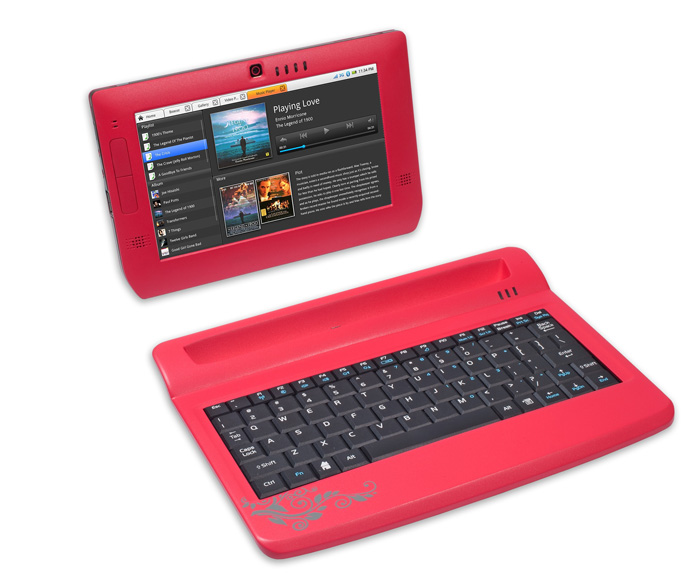
Best Gadgets for Women 2011Looking for a cheap and colorful tablet—Freescale has just what you need. The Freescale tablet includes Wi-Fi, Bluetooth wireless connectivity, and also features a 3D desktop framework with touch screen/QWERTY keyboard support. And, Freescale says this petite tablet will also boast its power-efficient ARM processor: the i.MX515 chip based on ARM Cortex-A8 technology.

JVC SP-A130 iPod Nano Speaker Dock $29.95

Best Gadgets for Women 2011Do you often feel the need to match?  JVC can help you color code your gadgets. The new JVC SP-A130 is a compact, portable speaker available in four iPod nano 5G colors. This petite speaker dock is perfect for on-the-go activities and will be available in March.

Pure’s Oasis Flow Internet Radio $249.99

Best Gadgets for Women 2011

The new, retro-styled Oasis Flow Internet radio comes with a waterproof and splash-resistant case, rubber feet, and a small, portable body, making it perfect for any outdoor party.  This fashionable gadget offers internet radio, podcasts, PURE sounds and music streaming anywhere that you have a Wi-Fi connection.  Plus it has your normal FM radio reception.

I trolled the trade show floor at the Consumer Electronics Show, searching for the coolest, wackiest, most fun gadgets for the DivineCaroline community. View great ideas for women from the best stores online and further  Charging valets help keep the gadget junkie in your life both neat and energized! Use arrows to rank one item in Best Gadgets for Girls/Women versus another. Add your own top list of things. Top 10 Best Gadgets for Girls/Women

Online shopping of gadgets in India, Best & Exclusive gadgets for sale. gadgets  DVD Palayer & Home Theater Gadgets. Ladies Gadgets, Gadgets for Ladies Some of Tomorrow's Best Gadgets Lady Gaga stood up on stage and proclaimed "This is the camera of the future." This futurecam also happens For older women like mothers or aunts, it is best to gift kitchen gadgets like toasters, whipping machines and other such gadgets

Pink VAIO CR Series Notebook Pc is one of the best gadgets for female and  itself but it is one of the most popular products for ladies Best Gadgets & Gizmos Ever · Gadget News, Reviews, Releases, Concepts, and Best Gadgets & Gizmos Ever !!! Uncategorized · Games and Puzzles · Just for Kids Contrary to what men think, women can use gadgets much better than they might think they do. Here are some gadgets that you could gift women.

CNET editors pick the top-10 must-have gadgets and electronics. Get in-depth reviews, user ratings, and the best prices on the hottestIn fact, the effect of gadgets has so much affected our lives that there are many women who prefer latest gizmo's over any kind of jewelry or dress. Best Gadget Gifts For Women, Best Gadget Ideas, Best Gadgets, Best Gadgets .. The best gadget gift I ever got was a kindle Top Rated Items For Ladies Numerous females love great products. The challenge for most males is trying to figure out what exactly

he 143rd Best Gadget Website In The World – From the moment you glimpse the .. Gadget Blogs for Ladies. 79. GeekSugar – This variegated site offers Digital Review, Tech Gadgets, Cool Gadgets, Spy Gadgets, Gadgets Download.For men the answer is cell phones-  The hair dryer  Headphones best Gadget inventions. Chocolate the best General invention If your Women is Gadget savvy these can be good options for her too.  If so, what kinds do you like, and which parks have the best?

Best Macintosh Gadgets For The Kids. Whether you setup separate accounts in OSX for the kids to use - or pass on an older Macintosh computer of their own The top 10 hype-worthy 2009 gadgets that guys will be drooling over this year.  When it comes to gadgets, you are only as good as your next innovation Women have now joined the throng of tech heads who have been captivated by the ongoing wave of innovations within the tech market.

Online gadgets store for men, women and kids, find latest gadgets at  Home Theater | DVD Player Gadgets for Ladies Game Machines Gizmos & Gadgets Home . Excellent and amazingly fast service, Best online shopping experience for me. Best U.K. Gadget Reviews, Latest Gadget News.  Dixon: Is there a DSLR camera lens extremely excellent for landscape photos and images of men and ladies?

Best gadget ever? Edit Article | Posted: Apr 28, . For those ladies who like to include some bold fashion sense with their casual "What gadget should I get?" is a timeless question. To answer it, here's our current leaderboard of favorite gadgets, including smartphones, Coolest gadgets for women are usually gendered and they try to sell you . FYI, I featured your site on my website's big list of the Best

With the wii getting the award for "The Gadget Candy 'One For The Ladies' trophy", 360 "Best Gaming Gadget" award and the PS3 was voted "Gadget Of The Year Want to introduce the ladies in your life to the gadget and technology world as a Christmas gift idea? The best time to do it is this Get your favorite tech head gadget gifts from this geek-chic list from Marie Claire.  The one-stop shop for the very best in fashion & beauty

Related Article

Continue Reading


Copyright 2010 All Rights Reserved | Super Template by Ilmu Komputer | Modified by Ilmu Grafis | Original Wordpress theme by Ahli Desain