
Sunday, February 13, 2011

Getting started and master Netflix for Wii

15 comments

Getting started with your Xbox 360How to stream movies and TV from your Nintendo console Gaming consoles have come quite a way in recent years in terms of adding functionality above and beyond simply playing amazing video games. The Nintendo Wii, Sony PlayStation 3 and Microsoft Xbox 360 have all added tools and programs to further the user's experience and create an added value. One example of this kind of functionality is using Netflix to watch instant streaming movies and episodes of television series right on your TV without the need for any additional hardware aside from the game console. All three consoles have Neflix functionality at this point, but we'll focus on getting Netflix streaming content working on the Wii console.

You may interested this related articles

Getting started and master Netflix for Wii

Getting started and master Netflix for WiiNetflix is one of the most popular media rental services on the planet, so there's already a pretty good chance that you have a Neflix account. However, if you don't, the first thing you'll need to do is create one. There are several levels of service subscriptions that Netflix offers, but the bare-bones, $8.99/month subscription is really all you need to watch all the streaming content you want. You can set up an account online in a matter of minutes, and once your account is active you can begin watching streaming content right on your computer. However, to watch your Netflix content for free on your Wii you'll need to complete a couple more steps.

Getting started and master Netflix for WiiSince you're already online with your Netflix account, simply navigate your address bar to www.Netflix.com/wii. From here you'll be able to order a free Wii Netflix disc with just a few clicks of your mouse. After completing this step you'll be able to relax for a few days while you await your disc to come in the mail. This is a great time to start building a list of content you plan on watching using the Instant Queue tool provided by Netflix. After logging into your Netflix account you can begin browsing instant streaming content using the Instant tab near the top of the screen. All of the content in this category is available to watch immediately. Unfortunately, not all of the content on the entirety of Netflix is available in instant streaming form, but you'll find that the majority of high-demand and popular content is. Once you find a movie or show you want to save to your queue, simply move your mouse over the "Watch" button and another small button will pop up above it saying "Add to Instant Queue". Click this, and your program is now saved to your Instant Queue until you decide to delete it later. After spending a good amount of time building your perfect Netflix library,it should be just about time for your disc to arrive in the mail.

Getting started and master Netflix for WiiPlace the Netflix Wii disc inside your Wii console and boot it up. Click the Netflix icon that now appears in your Disc Channel and wait a moment. From here you'll receive an activation code that will allow your Wii console to work hand-in-hand with the Netflix streaming service. Log in to your Netflix account using your computer and again navigate to netflix.com/wii. Here you'll be prompted to enter your activation code. Enter it and press the "Activate" button. After this your Wii will be authorized to work with Netflix.

Getting started and master Netflix for WiiAlmost immediately your Netflix Instant Queue should pop up on your screen, showing all of the content you've chosen using the computer-based tools you used earlier. You'll also be presented with several huge playlists of content based on different categories like Comedy, Horror and Drama, regardless of whether or not you have built your own Instant Queue, so you'll have plenty of stellar content to watch no matter what. However, if you took the time to build an Instant Queue, or chose to at any time in the future, your Wii will then suggest other content to you based on things you've watched from your queue. This is a fantastic feature that really pushes fantastic content to you that you may have otherwise missed. As of the time of this writing, there is no search feature included with the Wii version of Netflix. This means that whenever you want to search for any specific movie or television program you'll need to log on to your Netflix account using a computer. We can only hope that a full content browser is added at some point in the future, but as of right now the tools in place do a good job of allowing you to find content perfect for you, even if it takes just a little digging.

So there you have it; a fantastic and simple way to watch streaming Netflix content right on your TV, without the need for any hardware besides that little white Nintendo box you have anyway. If you have an Xbox 360 or a PlayStation 3, the process is a bit different, and we'll have guides on how to use Netflix for those two consoles shortly as well so be sure to check back!

You may interested this related articles

Also don’t forget to subscribe! or be a fan on facebook must have web rss ahli desain

Continue Reading

Getting started with your Xbox 360

0 comments

Getting started with your Xbox 360Microsoft's gaming console is an entertainment center in waiting The Xbox 360 has become the elder statesman of the "next generation" of video game consoles — but this is as much a testament to its ability to keep on the cutting edge of the market as it is to a vast video game library (some original Xbox games can be played on the 360, too). If you've finally gotten your hands on a 360, setting it up is a simple matter, but there are a few additional tricks to making it much more than just another video game system.

You may interested this related articles

Also don’t forget to subscribe! or be a fan on facebook must have web rss ahli desain
Hooking it up
After taking everything out of the box, you'll want to get it connected to your television for sure, and maybe your Getting started with your Xbox 360home theater system (for surround sound). All Xbox 360s come with a composite A/V cable, but there's an optional adapter that allows you to split the signal between that and a digital (optical) audio line that can run straight to your home theater; an HDMI A/V connection is also an available option. Depending on what kind of connections you have free on your TV and receiver, you can decide which of these arrangements is best for you and run your cables accordingly.

Who is that small person, and why is he waving at me?
Once you've got your 360 set up and turned on, you'll go through a quick setup procedure to do things like set the clock, register for tech support, and that kind of nuts-and-bolts stuff. And then something slightly unexpected happens: Your dashboard will want you to create a cartoon character, which will hang out while you're flipping through the Dashboard (what Microsoft calls the interface you have with your console). 

You can customize your avatar to look as much or as little like you as you want. (Mine shares the goatee and black T-shirt with, but has much better hair than, the real thing.) It's a cute touch, and if you have little ones at home, having a friendly character (or a reminder that Mom Is Making Sure You Behave Yourselves) can be a fun addition to the basic interface.

Each account on your 360 can have one of these little avatars; when you set up a second (or third, or eighth) profile, you can create an avatar that's unique for it.

Getting started with your Xbox 360
You're in control
The 360 has a somewhat novel option for turning it on, in addition to pushing the button on the front of the console. You can push the round, silver "jewel" in the middle of the controller to do so, too. This works for both wired and wireless consoles, and the first controller turned on will become Controller 1 for that session, regardless of which USB port it's plugged into or whether or not it was Controller 1, 2, 3, or 4 last time. 

This is especially handy if you've got folks in your house who are apt to leave their controller somewhere unusual (like the kitchen counter), since you're not tied to any particular configuration. If you have friends who want to bring their own controller for a gaming session, they can sync to your 360 for the evening, too.

The lights on the controller correspond to those surrounding the power button on the console: #1 in the upper left, #2 in the upper right, #3 in the lower right, and #4 in the lower left. This way, you can tell at a glance which one you're holding; this is especially convenient if you've got a lot of friends over and are trading controllers for drinks and snacks frequently.

While they're not expressly part of the initial setup, a lot of folks find that picking up the wireless controllers and the rechargeable battery pack that goes with them to be a worthwhile investment. The cable that charges the battery also carries the signal from the controller to the console, so even with a dead battery (or none at all), you can still use it.

Getting started with your Xbox 360Wave your arms 
The biggest new thing to come to the Xbox 360 is the new Kinect controller / interface, which is Microsoft's foray into the motion-controlled gaming field. Using detailed infrared motion-capture technology, it turns your body into the controller for an ever-growing collection of games. This promises to usher in a whole new realm, with the player in the room literallybeing the player in the game. Some clever independent users have already made 3D motion-capture cameras by hooking their Kinect controller up to their computers and working a little magic. Living in the future like this is amazing.


As when Nintendo rolled out the Wii, there have been reports of Kinect-related injuries and household mishaps. Please make sure you're not going to knock anyone or anything over if you decide to give this a try!

To the internet, and beyond!
The Xbox 360 really comes into its own when you connect it to your home network and the internet (this latter does require a subscription to Microsoft's Xbox Live service). The dashboard allows you to connect to music and movies you have on your computer(s), so you can play them on your television or home theater, turning your 360 into an entertainment center. 

By connecting to the internet, you will also be able to get updates to the dashboard, as well as take advantage of online services like Netflix and Twitter. You can even download movies and music from Microsoft's Zune Marketplace. Navigating these using your game controller takes a little getting used to if you're accustomed to visiting sites on your computer or smartphone, but their functionality remains the same.

Xbox Live (often referred to as XBL) has become one of the major selling points of the 360 (and one of the legacy systems to carry over from the original Xbox). It's a persistent online account that tracks the achievements you unlock in all the games you play (as do the local user profiles), with the added bonus of letting your friends see how and what you're doing. It also allows you to see which of them are online while you are, so you can strike up a conversation by using recorded voice messages, text messages, or even voice chat. You can also see if they want to play a game with you, if you've both got the same game handy.

XBL also allows you to play with folks you don't know, if the game you're using offers that feature (most sports, racing, and combat-type games do; many other types are adopting this as well). And if you find someone you enjoy playing with, it's easy to add them to your list of friends to get together with at another time.

Getting started with your Xbox 360
What are these "points"?
Setting an account up on Xbox Live also gives you the ability to download additional content, from purely cosmetic things like dashboard appearance kits and clothes for your avatar, to entire standalone games, to extra stuff for the games you've already got. This downloadable content (DLC) can be offered for free (a lot of games offer demo versions this way) or using XBL "points," which are the currency used by the system; there are 80 points to the dollar, but buying in bulk makes them cheaper. A few games have their own internal currency for purchasing in-game content; for instance, EA Sports' Madden NFL 11 uses "coins," which can be earned through certain types of game play as well as purchased using XBL points. 

Any way you look at it, DLC represents Microsoft's presence in the marketplace of microtransactions, all of which are completely optional.

Game on!

You may interested this related articles

Also don’t forget to subscribe! or be a fan on facebook must have web rss ahli desain
Hooking

Continue Reading

Getting started with your Nintendo Wii

0 comments

Getting started with your Nintendo WiiTrack down the controllers you'll need and the games to start with The Nintendo Wii was first released for sale in November 2006. In January 2011, the Wii was the best-selling console of its generation, beating out the PlayStation 3 and Xbox 360 to be the top console available. Of course, the Wii does more than just play video games. It can help you stay up to date on the weather and the news. The Wii can even stream movies to your living room through its built-in Netflix service.

You may interested this related articles

Also don’t forget to subscribe! or be a fan on facebook must have web rss ahli desain

If you're new to the Nintendo Wii, you might have some initial questions. How do you set it up? How many controllers do you need? Where do you get games? If those questions sound familiar, don't worry. We're here to help finding your mate gadget.

Setting up your Wii
The first thing you'll want to do when you get your Wii is set up your Wii in its stand. The plastic stand is made up of a boxy piece and a circle and should easily slide together. Plug in the wires according to how your home television system is set up and connect the sensor bar. You can place the sensor bar either below or above your television, using the included adhesive strip to help hold it in place.

Your Wii controller takes two AA batteries that pop into the back. When you start using the controller, make sure the Wii strap is firmly connected to your wrist. The news has reported many horror stories of people losing grip on their controllers as they play vigorously with their Wiis, sending the controllers flying through their television screens. So it's fairly important to make sure the controller strap is solid.

The remote controller that comes with your Wii should already be paired (or synchronized) with your console. If it's not, press the red button on the front of your Wii console, and then press the red button on the back of your Wii controller. The blue light on your controller should blink briefly, enabling you to use your Wii.

The first time you activate your Wii, the system will perform an automatic update and ask you for some basic information.

Getting started with your Nintendo WiiMake your Mii
Once you get fully into your Wii menu, you'll want to create a Mii right away. The Mii is an avatar version of you, but there's nothing saying it has to look like you. You can customize the height and width of your Mii and most of its features. You can also create more than one Mii, populating your own little Mii village inside the Wii.

The Mii is used for games like Wii Fit, where the Mii stands in for you during the game's action. In Wii Sports, for example, your own actions control how well the Mii plays the game at hand.

Choose your controllers
Most Wii bundles come with a single Wii Remote, which is the official name for the Wii's controller. However, the great thing about a Wii is that you can play it with friends. You should decide if you're likely to play the game with a single friend or with a group, so that you can get the appropriate number of controllers. You will definitely want Nunchuk Controllers to go along with your main controllers. Not all games use the Nunchuk, but a lot of the best games do.

The Wii Balance Board goes along with the Wii Fit, which makes your Wii game system a fun way to stay in shape. If you want to use your Wii to help supplement your fitness regimen, then you should definitely consider picking up this additional accessory. You should also check out our list of 3 Wii accessories you can't live without for a few more ideas of some great Wii additions.

Getting started with your Nintendo Wii

Get a few great games
The standard Wii comes bundled with Wii Sports. If you want the quintessential Nintendo Wii experience, there are a few games you should definitely check out first. If you've ever played any of the Mario Brothers titles before, then you should definitely check out New Super Mario Bros. Wii. Mario Kart Wii is definitely a great party game and a lot of fun to play even by yourself.

Play with it
The most important thing to do as soon as you get a Wii is just to play with it. The Wii gaming experience is unlike any other. There's nothing like the experience of waving your Wii controller and scoring points, winning games, and generally having a great time. In addition, there are many games that exist only on the Wii. The best thing you can do to get started is to stick a game in the Wii and start playing.

You may interested this related articles

Also don’t forget to subscribe! or be a fan on facebook must have web rss ahli desain

Continue Reading

Top 10 Must Have Gadgets For 2011: Earphone, TV And More

1 comments

must have gadgets for the geek familyTop 10 Must Have Gadgets For 2011 For all those tech-geeks, who want to check on their misses this year, here is a list of 10 best gadgets created in 2010. So before this year ends, make sure to have all of them, as it’s really worth having them in the coming new year. Just have a look. iPod media players were invented by Apple on 2011. Play iPod iPhone or USB music through your original car radio, stereo using the controls and displays of your vehicle.  now what’s the Top 10 Must Have Gadgets For 2011 here about

You may interested this related articles

Also don’t forget to subscribe! or be a fan on facebook must have web rss ahli desain

  1. Logitech Squeezebox radio: A brilliant wi-fi radio from Logitech. Stream hundreds of free Internet radio stations or customize your own at sites like Pandora and Last.FM.
  2. Logitech Harmony One universal remote: One remote to rule them all. Sleek design, both in terms of cosmetics and ergonomics; sharp LCD that offers a touch-screen interface and touch-sensitive buttons for navigation of onscreen menus; web programmable via Windows or Mac PCs; excellent button layout and design; rechargeable lithium-ion battery and docking station, do you need anything else?
  3. Sonos S5 Zone Player and BR100 ZoneBridge: Sonos keeps raising the bar for home music-listening, and now you can control your listening, whether through iTunes, Pandora, Internet radio or Wolfgang’s Vault via an iPhone/iPad app.
  4. Sling Media Slingbox Pro-HD: Streams home TV and other audiovisual sources to any broadband-connected Mac, Windows PC, Windows Mobile, Palm, or Symbian device in the world; streams HD video (bandwidth permitting); no host PC or monthly charges required.
  5. Shure SE530 Sound Isolating Earphones: We’re not necessarily recommending you drop $500 on earbuds, but if you do, we’d love to borrow them. Duel woofers in each ear.
  6. Kindle 3: As great as the iPad is, it still doesn’t improve upon the book-reading experience of Kindle’s e-ink. This year’s model is improved in just about every way: faster, lighter, longer battery life, better contrast and bigger storage.
  7. Panasonic Viera TC-P50VT20/25 3D TV: Superior black-level performance and excellent shadow detail; accurate primary colors in THX mode; great color saturation; effective antireflective screen; reproduces 1080p/24 cadence properly; VieraCast provides access to select Internet services and improved customization; solid 3D picture quality; includes 3D glasses.
  8. iPhone 4: As exciting as the original iPhone was, there were lots of missing features to complain about. The iPhone 4 has silenced most of those criticisms with a gorgeous display, one of the best cameras of any phone and Facetime.
  9. Kinect for the Xbox: Nintendo made gaming a less inactive activity a few years ago, and Microsoft has taken that idea to the next level with Kinect. Already, some mind-boggling hacks have used the new technology in ways Microsoft probably never imagined.
  10. Apple iPad: wow! I guess it will top the charts of everyone out there; this is the best gadget we got this year. Steve Jobs continues to revolutionize the way we use technology, an outstanding tablet with unbound comparison.

You may interested this related articles

Also don’t forget to subscribe! or be a fan on facebook must have web rss ahli desain

Continue Reading

Most Wanted Gadgets Sees iPod Car Accessories

0 comments

must have gadgets for the geek familyiPod media players were invented by Apple on 2011. Play iPod iPhone or USB music through your original car radio, stereo using the controls and displays of your vehicle. Connect and charge your iPod, iPhone, USB mobile storage or MP3 player through your original car stereo. You can control your music device from your car radio and/or steering wheel controls and view your iPod and USB menu on the original display of the car. We a stock all types of Car iPod Accessories, Car iPod Solutions, iPod iPhone Car Adaptors

You may interested this related articles

Also don’t forget to subscribe! or be a fan on facebook must have web rss ahli desain

Also iPod Car Kit, iPod iPhone Car Interfaces like Dension Gateway 500, Dension Gateway 300, Dension Gateway 100, Dension Gateway Lite, Dension bluetooth car kit, Dension AVR, iPod cable, cradle or dock cable, Dice iPod iPhone car accessories and Connects2 iPod interfaces, USB adaptors and Aux interfaces. The varieties of the models support the multiple options that are included in order for the customers to make the choice. The iPod models that get the most response are:-

• iPod Classic- based on the hard drive
• iPod Touch- the touch screen
• iPod Nano- video enabled
• iPod Shuffle- the compact one

It gives the facility of the external data storage device. You may find memories of iPods that range from 2 Gb to 160 Gb as well.

Though the iPod phones and the iPods are the same products yet they are treat as different nowadays. The iphone can embody music and Videos following the function of the iPod Touch apps.

The iPod car accessories were made popular a few decades because owing to its essential and innovative function. Today too the iPod car accessories are a must addition in the car and are purchased by many car lovers.

You can purchase the iPod accessories as per your choice as there are number of different kinds of the iPod car accessories available. They are the versatile ones.

Let us now take a quick look at what the various kinds of car accessories are.

• The car stereos - It will be better if you can choose this accessory made up by iPod compatibility. You may find several companies that meet your requirements. From this you may select the best one. However, the durability of the tech savvy gadgets is dependent on your purchase and the kind of requirements you have. Through the head of the stereo will be able to control the iPod as well as the steering wheel buttons; so it is indeed a great boon.

• The FM Transmitter - These iPod car accessories are the bridge to connect the iPod with the car stereo. It helps to transfer the signal through an analog devise that is kept by the radio. However the features and the functions both are dependent on the type of model. Being wireless this model can be carried easily from here to there.

• Mount - To place the iPod firmly this is a must have and especially for iPod car accessories this is the best. There are number of designs of the mount that are available in the market. In order to purchase the mount model you can get both the facilities-

1) It protects the parts of the gadgets
2) iPod gets the ability to access the desired music.

While selecting the iPod car accessories you need to be very careful about it. This is because there might be some iPods that do not have all the facilities that you may want. So to meet your requirements check the compatibility of the iPod car accessories. There are several names of the iPod car accessories service providers who serve the best quality of the accessories.

If you want the quality iPod car accessories models, that will be durable as well, do not waste time to log on to other site. They offer the best quality iPod models and service also. So buy from them now!

You may interested this related articles

Also don’t forget to subscribe! or be a fan on facebook must have web rss ahli desain

Continue Reading

5 must have gadgets for the geek family

0 comments

must have gadgets for the geek family10It’s been a kid weekend, for me. Top 10 Must Have Gadgets For 2011: Earphone, TV And More While I don’t normally focus on family-friendly tech, the events of this weekend (movies and family time and Internet, oh my!) have made me realize that there are 5 things that are indispensable tools that every family should have. That said, I’m sure you have your own, but here’s my list:

You may interested this related articles

Also don’t forget to subscribe! or be a fan on facebook must have web rss ahli desain

Netflix

must have gadgets for the geek familyphoto © 2008 Jamie McCall |  more info(via: Wylio)Oh sure, you can call it an app. But really, Netflix has turned into much more than just an app, for us. The greatest part about Netflix is in its portability. I love the fact that I can take a netbook in the car and stream shows for the kids to watch via a lowly 3G connection.

What becomes the quandary, at least for us, is deciding how we watch the content that we watch on Netflix. Do we invest in a Roku box? Maybe an Xbox 360? Or the Apple TV could be a great choice. As of yet, we’ve not settled onto any one device, so we’re typically watching via the MacBook Pro or some other computer in the house. We’ll make our decision soon, but not just yet. We just know that it’s $9 per month well spent.

Netbooks

must have gadgets for the geek familyphoto © 2010 Intel Free Press |  more info(via: Wylio)Yes, netbooks are family tools for us. My son, aged 8, is at the point where he’s gotten really curious about what he sees dad doing all the time. My daughter, though not quite as interested, has quite the fondness for Disney games. Right now, our on-loan HP Mini 210 is their best friend.

The joy of netbooks for the kids is in all of the things that we tech types tend to find annoying. They’re simple, they’re cheap (for the most part) and they’re small. In other words, they’re perfect for kid hands and to help them learn how to properly use a computer. Mix a netbook with a locked down copy of Windows 7 and you’re about as safe as any computer can get.

Also don’t forget to subscribe! or be a fan on facebook must have web rss ahli desain

Flip-style Video Cameras

must have gadgets for the geek familyphoto © 2010 Yu Morita |  more info(via: Wylio)Our personal camera of choice right now is the Kodak Playtouch. It takes perfectly acceptable pictures in bright light, and does amazing 1080p video just about anywhere you could want. The on-screen controls are simple enough for the kids to use and most flip-style cameras are built like a tank. They really can take a fair amount of abuse without falling victim to tragedy.

For as long as I can remember, my kids have wanted to take pictures. Instead of handing over my fairly expensive Canon to their munchkin hands, I toss them the Playtouch and let them go crazy with it. While I typically end up with fifty pictures and a few minutes of video of my dog walking across the room, they still have a great time when we hook up the HDMI to the TV and look back at their “work”.

Good MP3 Players

Maybe this seems like a cop-out, but it’s really not. The fact of it is that music does indeed soothe the cranky 6 year old just as much as it does the savage beast. Now sure, you could go buy the cheapest mp3 player on the market, but you’re going to get what you pay for.

Investing a few dollars in to a simple, but well-built (the iPod Shuffle and Samsung’s Galaxy Player come to mind) mp3 player will serve you well for years to come. Not only are they rigid enough to handle the bumps that will inevitably come, they also have controls such as volume limiting that really are important when you’re placing speakers only a few millimeters away from your kids’ ear drums.

eBook Readers

must have gadgets for the geek familyphoto © 2009 goXunuReviews | more info(via: Wylio)I’ll cop to it — I let my kids play games on the computer. Why? Not only for entertainment, but also because it helps them find interest in reading. When they have to read to understand what’s going on in a game, that’s a big bonus in my perspective. Once they’re ready, step them up to an e-reader of some sort. There is a huge selection of them on the market, and some of them are incredibly cheap. The newest Kindle, for instance, or maybe the previous generation of the Nook.

Load them up with kids books. There are loads of them available for purchase, and even more available for free across the Internet. Just do yourself a favor and watch what they are reading. Just because they’ve taken an interest doesn’t mean that it’s all fair play.

The iPod media players were invented by Apple on 2011. The varieties of the models support the multiple options that are included in order for the customers to make the choice. The iPod models that get the most response are:-

• iPod Classic- based on the hard drive
• iPod Touch- the touch screen
• iPod Nano- video enabled
• iPod Shuffle- the compact one

So that’s my list. What’s on yours? Anything that your family simply can’t do without? Let me know in the comments. I’ll be here, watching movies and reading what you say.

You may interested this related articles

Also don’t forget to subscribe! or be a fan on facebook must have web rss ahli desain

Continue Reading

10 most wanted gadgets for college students 2011

9 comments

Unusual and Creative Gadget10 most wanted gadgets for college students 2011 is in The hardest part about being in college is the struggle to make ends meet while living on a student budget. OK, we all know it’s really waiting to turn 21, but the budget thing is quite a challenge as well, especially when it comes to wanting the latest and greatest gadgets and knowing you can’t afford them. That’s what they invented Golden Year 2011 for and wealthy relatives. So, check out our list for all the ways you can make your favorite college students’ day this year 2011.

You may interested this related articles

Coffee Maker
Starting at: $8

10 most wanted gadgets for college students 2011OK, we know it sounds lame, but this is actually a dual-purpose gift. As the parent of a college student giving the gift of caffeine can end up preventing them from taking out more private student loans to fund their Starbucks habit every year.
The Keurig Single Serve model is perfect for the college student even though it may not be at the top of list. It’s just like your advice that the basket weaving degree he/she enrolled in may not be the most sensible choice; your coffee maker gift comes free with year’s worth of knowledge and experience.

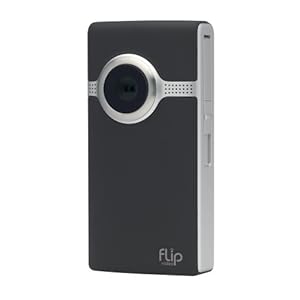
Flip Camcorder
Starting at: $149

10 most wanted gadgets for college students 2011In the YouTube generation being armed with a video camera at all times can be quite a powerful thing. Turn your college student into a citizen journalist, an amateur documentary filmmaker, or the next spotlight on Tosh.0.

Sure there will probably be some recordings you’d rather turn a blind eye to, but remember that there’s really nothing more valuable to take away from college than the memories, so why not make it easier to preserve them?

George Foreman Grill
Starting at: $20

10 most wanted gadgets for college students 2011What started out as a bit of an infomercial joke, has turned into a college student must-have. If you haven’t already, pick up one of the many varieties of George Foreman grills, ranging from the very portable 36 sq. inch model to the 160 sq. inch 360 model.

Fast food will take on a whole new meaning once this baby enters the picture.

HTC Evo 4G

Starting at: $200

This wouldn’t be a proper gadget list if we didn’t include a smartphone. The HTC Evo is getting a ton of buzz for its 1 GHz processor, HD video streaming, and dual front and back cameras. It’s the first 4G phone to hit the market, and we’re actually not shying away from it.

It’s only available on Sprint so this Golden Year 2011 gift may have to come with an accompanying new service agreement stocking stuffer.

iHome iP49 Portable Audio System
Starting at: $160

10 most wanted gadgets for college students 2011For use from everything from an alarm clock to a party starter, an iPod/iPhone audio system is almost as necessary as next semester’s textbooks.

What makes this model special is that it includes FM radio and comes with a convenient carrying case, perfect for say a Spring Break road trip or for providing a much-needed classical music backdrop to every study session.

iPad
Starting at: $499

10 most wanted gadgets for college students 2011Web videos are popping up every other day showcasing the next awesome use for Apple’s iPad. More expensive than an iPod, but more affordable than a MacBook, Apple’s latest best seller just may be the perfect compromise for your college student.  Plus, there’s an educational use.

Super portable and Web enabled, the iPad is perfect for notetaking in class, creating presentations - for that matter giving presentations - and students can even download their lecture notes and required readings. So, this holiday season give the gift of gadget and knowledge in one pretty sleek and simple package.

Logitech Revue Companion Box with Google TV

Starting at: $299

10 most wanted gadgets for college students 2011With this new gadget you can turn any TV into a smart TV, bringing together the television, the Web, apps, and movies.

Compatible with Android phones and apps and digital video recorders (DVRs), your college student receives Google TV programming all controllable by the wireless keyboard with built-in touch pad, eliminating the need for remotes or mice.

This choice will surely make your student the envy of all the fellow co-eds.

Microsoft Arc Keyboard
Starting at: $60

10 most wanted gadgets for college students 2011So this item is actually practical; think about how many countless hours your college student spends hammering away on their keyboard.

Much less clunky than last generation’s ergonomic keyboards and much more aesthetically pleasing. And who are we kidding; it’s one of the most affordable items on our list.

Mini Keg Fridge
Starting at: $159

10 most wanted gadgets for college students 2011It may be a tough pill to swallow, but we’re going to let you in on a little secret: your of age college student is going to have a drink or two throughout the four or more years it takes to graduate.

If you want to make sure your college student makes and keeps a quality group of friends, you have to arm him or her with the tools of successful friend-making. The mini keg is small enough to fit in a dorm room - even small enough to hide from the RA in a secret nook or cranny - and cool enough (pun intended) to make your student the talk of the hall.

Netflix Subscription

Starting at: $4.99/month

10 most wanted gadgets for college students 2011Now that Netflix can stream straight the computer, the Xbox, and the Wii, or arrive directly in the mailbox, anything and everything film is available at a college student’s fingertips.

Plus, this gift is a totally affordable option. Any college student these days has become a master at multitasking - otherwise known as procrastinating - and having a video playing while typing an end-of-term lit paper is quite the norm. And believe us, a Netflix subscription might actually come in handy for film class; yes they do actually count for credit these days.

New Xbox 360
Starting at: $299

10 most wanted gadgets for college students 2011College should be about a nice balance between work and play...hours and hours of online, head-to-head play. When it comes to video game consoles few have the notoriety and popularity of Xbox.

The new 360 has more memory, wi-fi, a faster processor, five USB ports, and is slimmer. But the thing that will excite your college student the most is the elimination of the red ring of death with the introduction of Valhalla chip, which also makes the system run quieter and saves energy.

You may interested this related articles

Continue Reading


Copyright 2010 All Rights Reserved | Super Template by Ilmu Komputer | Modified by Ilmu Grafis | Original Wordpress theme by Ahli Desain